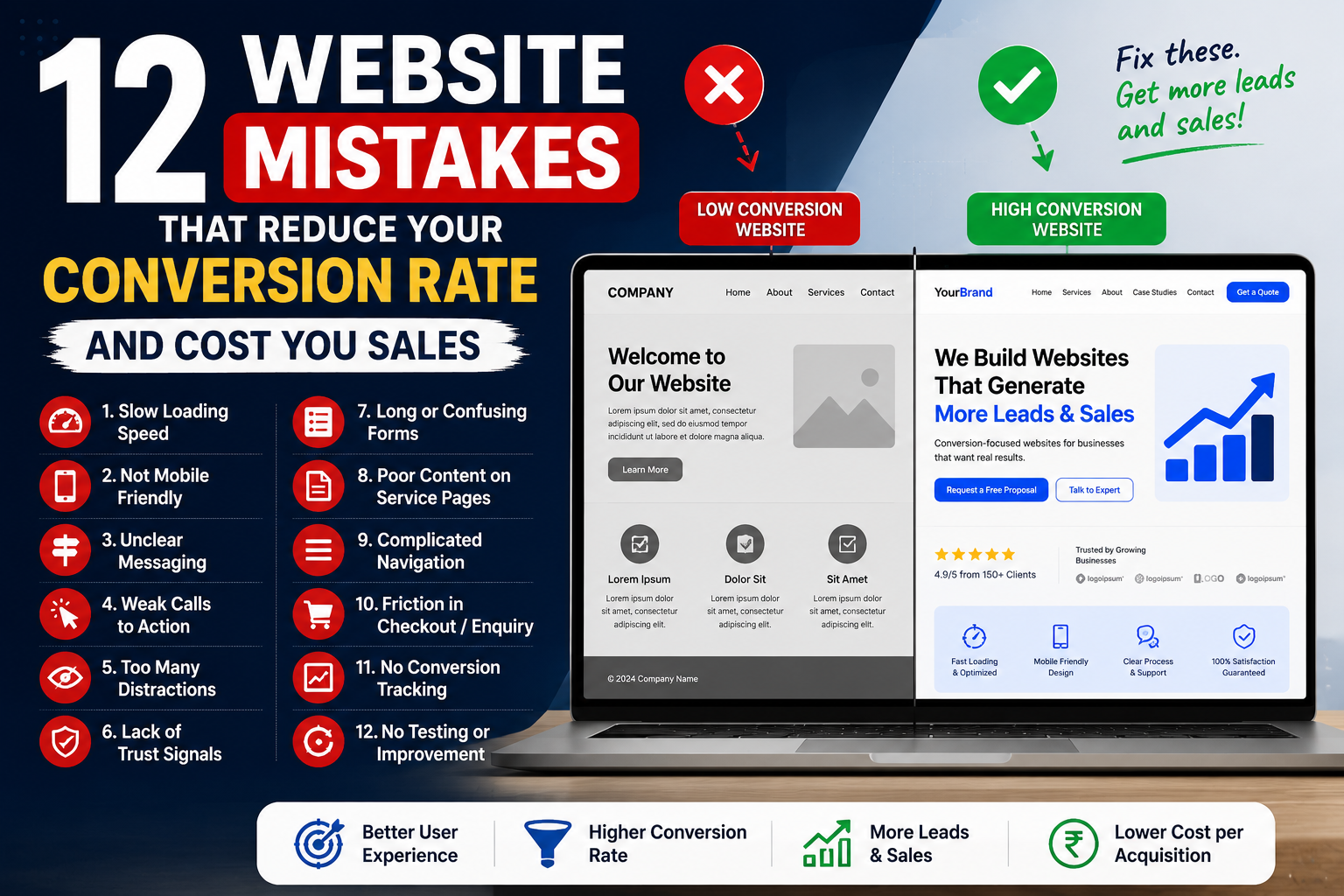
Your website may be receiving traffic from Google, Meta Ads, social media, referrals or email campaigns—but traffic alone does not generate business growth.
Visitors must take a meaningful action.
That action may include:
- Submitting an enquiry
- Calling your business
- Starting a WhatsApp conversation
- Booking an appointment
- Requesting a quotation
- Purchasing a product
- Registering for a service
- Downloading a brochure
The percentage of visitors who complete the desired action is known as the website conversion rate.
A website may look modern and still fail to convert. Slow speed, weak messaging, poor mobile usability, unclear buttons and complicated forms can prevent interested visitors from becoming customers.
This guide explains 12 common mistakes that reduce your website conversion rate and how to fix them.
Table of Contents
- Your Website Loads Too Slowly
- Your Website Is Not Mobile-Friendly
- Your Headline Is Unclear
- Your Calls to Action Are Weak
- Your Website Has Too Many Distractions
- You Are Not Building Enough Trust
- Your Forms Are Too Long or Confusing
- Your Service and Product Pages Lack Detail
- Your Website Navigation Is Complicated
- Your Checkout or Enquiry Process Has Too Much Friction
- You Are Not Using Conversion Tracking
- You Are Not Testing or Improving the Website
- How to Measure Website Conversions
- How UpscaleEra Helps Improve Conversion Rates
- Frequently Asked Questions
What Is a Website Conversion Rate?
A website conversion rate is the percentage of visitors who complete a desired action.
For example, if 1,000 people visit your website and 30 submit an enquiry, the conversion rate is 3%.
Different businesses may track different conversions.
Service Business Conversions
- Contact-form submissions
- Phone calls
- WhatsApp enquiries
- Appointment bookings
- Quotation requests
- Brochure downloads
eCommerce Conversions
- Product purchases
- Add-to-cart actions
- Checkout initiation
- Email registrations
- Repeat purchases
- Subscription sign-ups
B2B Conversions
- Demo requests
- Consultation bookings
- Proposal requests
- Lead-form submissions
- Whitepaper downloads
- Sales-meeting bookings
Improving your website conversion rate does not always require more website traffic.
Sometimes, fixing the existing customer journey can generate more leads or sales from the traffic you already receive.
Why Website Conversion Rate Matters
Consider two websites receiving the same amount of traffic.
| Metric | Website A | Website B |
|---|---|---|
| Monthly visitors | 5,000 | 5,000 |
| Conversion rate | 1% | 3% |
| Leads or sales | 50 | 150 |
Website B generates three times more conversions without increasing traffic.
A stronger conversion rate can help your business:
- Generate more leads
- Reduce advertising waste
- Lower customer acquisition cost
- Improve return on ad spend
- Increase online sales
- Improve sales-team efficiency
- Get more value from SEO traffic
- Scale campaigns more confidently
This is why conversion-focused website development is as important as attracting visitors.
1. Your Website Loads Too Slowly
Website visitors expect pages to load quickly.
When a page takes too long to open, users may leave before reading the headline, exploring the offer or submitting an enquiry.
Website speed can be affected by:
- Oversized images
- Cheap or weak hosting
- Heavy themes
- Too many plugins
- Unnecessary scripts
- Large video backgrounds
- Poor coding
- No caching
- Unoptimised databases
- Third-party applications
A slow website can reduce both user satisfaction and your website conversion rate.
How to Fix It
Improve performance by:
- Compressing images
- Using WebP or AVIF formats
- Choosing reliable hosting
- Enabling browser caching
- Reducing unnecessary plugins
- Removing unused scripts
- Using lazy loading
- Optimising fonts
- Improving code quality
- Testing mobile performance
Do not judge speed only on desktop Wi-Fi.
Test your website on a mobile device and a normal mobile-data connection.
2. Your Website Is Not Mobile-Friendly
A website can look excellent on a large desktop screen and still be difficult to use on mobile.
Common mobile problems include:
- Small text
- Tiny buttons
- Overlapping sections
- Cut-off images
- Horizontal scrolling
- Difficult forms
- Slow menus
- Pop-ups covering the screen
- Complicated checkout
- Buttons placed too close together
Visitors arriving from Instagram, Facebook, WhatsApp and mobile Google searches usually expect a smooth mobile experience.
A mobile-friendly website should not simply shrink the desktop layout. The complete user journey should be planned for smaller screens.
How to Fix It
Check whether:
- Text is readable
- Buttons are easy to tap
- Menus open correctly
- Forms are simple
- Phone numbers are clickable
- WhatsApp buttons work
- Images resize properly
- Product pages are easy to browse
- Checkout is smooth
- Key information appears early
A conversion-focused website should make it easy for mobile users to take action with minimal effort.
3. Your Headline Is Unclear
The first headline should help visitors immediately understand:
- What you offer
- Who it is for
- What benefit they receive
- What they should do next
Weak headline:
Welcome to Our WebsiteThis does not communicate the service or value.
Stronger headline:
Conversion-Focused Shopify and WordPress Websites for Growing BusinessesAnother example:
Generate More Qualified Leads With Performance Marketing and High-Converting Landing PagesA clear headline can improve the website conversion rate because visitors understand the offer without searching through the full page.
How to Fix It
Write headlines that include:
- The customer
- The problem
- The solution
- The main benefit
- A relevant differentiator
Avoid vague statements such as:
- We Create Excellence
- Your Partner in Success
- Welcome to Our World
- Building Better Futures
These phrases may sound professional but do not clearly explain what the business does.
4. Your Calls to Action Are Weak
A call to action tells visitors what to do next.
Common calls to action include:
- Book a Consultation
- Request a Quotation
- Call Now
- Start a WhatsApp Chat
- Shop Now
- Schedule an Appointment
- Get a Free Audit
- View Available Packages
- Download the Brochure
Weak calls to action include:
Click HereSubmitLearn MoreThese are not always wrong, but they may not clearly communicate the result of clicking.
How to Fix It
Use specific action-led buttons such as:
Book Your Free ConsultationRequest a Website ProposalTalk to a Marketing ExpertCheck Product AvailabilityPlace important calls to action:
- Near the top of the page
- After key benefits
- Near testimonials
- At the end of service sections
- At the bottom of the page
Do not use five different primary actions on the same page. Identify the most important conversion goal.
5. Your Website Has Too Many Distractions
Adding more elements does not always create a better website.
Too many banners, buttons, animations, colours and pop-ups can make the page confusing.
Common distractions include:
- Multiple pop-ups
- Autoplay videos
- Constant animations
- Too many menu items
- Several competing buttons
- Large blocks of unrelated content
- Excessive sliders
- Flashing offers
- Multiple notification bars
When visitors do not know where to look, they may leave without taking action.
How to Fix It
Simplify the page.
Each important page should have:
- One clear goal
- One primary call to action
- Logical content order
- Consistent visual style
- Enough white space
- Clear headings
- Limited distractions
A clean layout can improve your website conversion rate by making the customer journey easier to understand.
6. You Are Not Building Enough Trust
Customers may hesitate to submit an enquiry or complete a purchase when the website does not feel trustworthy.
Important trust signals include:
- Genuine customer reviews
- Case studies
- Client logos
- Team information
- Office address
- Contact details
- Professional email address
- Certifications
- Secure payment options
- Privacy policy
- Terms and conditions
- Return or refund policy
- Real product photographs
- Clear company information
For service businesses, visitors may want to see previous work and understand who will manage their project.
For eCommerce businesses, customers may want clarity about shipping, payments, returns and customer support.
How to Fix It
Add trust signals near important conversion points.
For example, beside an enquiry form, you can include:
- Response time
- Privacy assurance
- Client count
- Consultation process
- Customer rating
- Relevant certification
Avoid fake testimonials, misleading counters or unsupported claims.
Trust should be specific, genuine and easy to verify.
7. Your Forms Are Too Long or Confusing
Forms are one of the most important parts of the conversion journey.
A form that asks too many questions can reduce submissions.
A form that asks too few questions may generate poor-quality leads.
The right length depends on:
- Service value
- Customer type
- Sales process
- Qualification requirements
- Buying stage
Basic Lead Form
A basic form may request:
- Name
- Phone number
- Service required
- Message
Qualified Lead Form
A more detailed form may request:
- Business name
- Website URL
- Service requirement
- Budget range
- Timeline
- Current challenge
- Preferred contact method
How to Fix It
Use only the questions necessary for the next step.
Also make sure:
- Labels are clear
- Error messages are understandable
- Required fields are marked
- The submit button is specific
- Mobile fields are easy to complete
- The confirmation message explains what happens next
Instead of:
SubmitUse:
Request My Consultationor:
Send My Website Requirements8. Your Service or Product Pages Lack Detail
Visitors need enough information to make a decision.
A weak service page may include only:
- A short paragraph
- A generic image
- A contact button
A strong service page should explain:
- The problem
- The solution
- Who the service is for
- Benefits
- Process
- Deliverables
- Timelines
- Frequently asked questions
- Relevant work
- Next step
A strong product page should include:
- Product title
- Clear images
- Benefits
- Features
- Ingredients or specifications
- Usage information
- Shipping details
- Reviews
- Return information
- Related products
- Clear add-to-cart button
How to Fix It
Create pages based on customer questions.
Ask:
- What does the visitor need to know?
- What objections might prevent action?
- What proof can reduce uncertainty?
- What happens after the enquiry or purchase?
Detailed, well-structured content can improve both SEO and the website conversion rate.
9. Your Website Navigation Is Complicated
Visitors should be able to find important information without confusion.
Navigation problems include:
- Too many menu items
- Unclear labels
- Important pages hidden
- Broken links
- Different menus on different pages
- No search function
- Complicated product categories
- No mobile navigation plan
How to Fix It
Use clear menu labels such as:
- Services
- About
- Portfolio
- Pricing
- Blog
- Contact
- Shop
- Categories
Avoid unclear labels such as:
- Discover
- Experience
- Explore More
- Our Universe
These terms may be creative but can make navigation harder.
For eCommerce websites, organise:
- Products
- Collections
- Filters
- Search
- Cart
- Account
- Checkout
A simple navigation structure can help visitors reach conversion pages faster.
10. Your Checkout or Enquiry Process Has Too Much Friction
Friction is anything that makes the customer journey harder than necessary.
Examples include:
- Creating an account before checkout
- Unexpected delivery charges
- Too many checkout steps
- Limited payment methods
- Complicated enquiry forms
- Broken coupon codes
- Slow payment pages
- No confirmation message
- No guest checkout
- Unclear return policy
- Repeated information requests
Every unnecessary step can reduce conversions.
How to Fix It
For eCommerce websites:
- Offer guest checkout
- Show shipping charges clearly
- Provide trusted payment options
- Reduce unnecessary fields
- Display delivery information
- Keep cart totals visible
- Test checkout on mobile
For service websites:
- Keep forms simple
- Add call and WhatsApp options
- Confirm successful submission
- Explain response time
- Allow appointment scheduling
- Avoid asking for information twice
Improving these steps can increase the website conversion rate without increasing advertising spend.
11. You Are Not Using Conversion Tracking
Without tracking, you may know how many people visited the website but not what they did.
Important conversions may include:
- Form submissions
- Phone-number clicks
- WhatsApp clicks
- Appointment bookings
- Product purchases
- Add-to-cart events
- Checkout initiation
- File downloads
- Email sign-ups
Useful tracking tools may include:
- Google Analytics 4
- Google Tag Manager
- Google Search Console
- Meta Pixel
- Meta Conversion API
- Google Ads conversion tracking
- Shopify analytics
- CRM systems
How to Fix It
Create a tracking plan before running advertisements.
For each important action, define:
- Event name
- Page
- Platform
- Value
- Source
- Reporting method
Do not rely only on button-click counts.
Where possible, connect website data with qualified leads, sales and revenue.
12. You Are Not Testing and Improving the Website
A website should not remain unchanged for years.
Customer behaviour, devices, competitors and marketing channels continue to change.
Conversion optimisation may involve testing:
- Headlines
- Calls to action
- Form length
- Page layout
- Testimonials
- Product images
- Offers
- Pricing presentation
- Checkout flow
- Mobile design
- Page speed
How to Fix It
Review website performance regularly.
Check:
- Which pages receive traffic?
- Where do visitors leave?
- Which forms perform best?
- Which devices convert?
- Which traffic sources generate customers?
- Which pages are slow?
- Which buttons receive clicks?
- Which products are abandoned?
Use real data rather than changing the website based only on personal preference.
Continuous improvement is essential for a stronger website conversion rate.
How to Measure Website Conversion Performance
Track these metrics:
| Metric | What It Shows |
|---|---|
| Website visitors | Total traffic |
| Conversion rate | Percentage completing the desired action |
| Form-completion rate | Form submissions compared with visitors |
| Add-to-cart rate | Visitors adding products to cart |
| Checkout completion rate | Checkouts converted into purchases |
| Bounce or engagement data | Whether visitors interact with the page |
| Cost per conversion | Marketing cost for each action |
| Customer acquisition cost | Cost of acquiring a customer |
| Revenue per visitor | Revenue generated from traffic |
| Mobile conversion rate | Performance on mobile devices |
Compare conversion rates by:
- Device
- Traffic source
- Landing page
- Location
- Campaign
- Product
- Service
- New and returning users
A single overall percentage may hide important differences.
Website Conversion Rate Improvement Checklist
Use this checklist before launching or redesigning a website:
- Website loads quickly
- Mobile layout works correctly
- Headline explains the offer
- Main CTA is visible
- Contact details are easy to find
- Forms are tested
- WhatsApp button works
- Phone link works
- Service pages are detailed
- Product pages answer key questions
- Reviews are visible
- Trust signals are genuine
- Checkout works on mobile
- Analytics is connected
- Conversion events are configured
- Confirmation messages work
- Privacy policy is available
- Links are not broken
- Images are compressed
- Website is regularly reviewed
How UpscaleEra Helps Improve Website Conversion Rates
UpscaleEra develops conversion-focused websites, Shopify stores, WordPress websites and landing pages designed to support measurable business goals.
The process can include:
- Website audit
- User journey planning
- Conversion-focused design
- WordPress development
- Shopify development
- WooCommerce development
- Landing-page development
- Mobile optimisation
- Speed optimisation
- Form development
- WhatsApp integration
- Analytics setup
- Meta Pixel integration
- Google Ads tracking
- Conversion-rate optimisation
Explore UpscaleEra’s website development services:
https://upscaleera.com/website-development/Businesses planning to drive traffic through advertising can also explore:
https://upscaleera.com/performance-marketing/For social media and demand-generation support:
https://upscaleera.com/social-media-marketing/Final Thoughts
A low website conversion rate is not always caused by poor traffic.
The problem may exist in:
- Website speed
- Mobile usability
- Headline clarity
- Calls to action
- Page design
- Trust
- Forms
- Product information
- Checkout
- Tracking
- Follow-up
- Lack of testing
Before spending more money on advertising, review whether the website is prepared to convert additional visitors.
A strong website should make it easy for users to:
- Understand your offer
- Trust your business
- Find relevant information
- Take the next step
- Complete the conversion
Improving the customer journey can generate more business from the same amount of traffic.
Ready to Improve Your Website Conversion Rate?
Is your website receiving traffic but not generating enough enquiries or sales?
Use the anchor text:
Request a website conversion auditLink it to:
https://upscaleera.com/contact/UpscaleEra can review your website speed, mobile experience, calls to action, forms, landing pages, tracking and conversion journey.
Frequently Asked Questions
What is a good website conversion rate?
There is no universal conversion rate that applies to every business. It depends on the industry, traffic source, customer intent, offer, website type and conversion goal. Compare your website against its own historical performance and business profitability.
How can I improve my website conversion rate?
Improve page speed, mobile usability, headlines, calls to action, trust signals, forms, service information, checkout and conversion tracking. Use website data to identify the biggest problem areas.
Why is my website getting traffic but no leads?
Visitors may not understand the offer, trust the business or know what to do next. Slow loading, weak calls to action, complicated forms and irrelevant traffic can also reduce leads.
Does website speed affect conversions?
Yes. Slow-loading pages can cause visitors to leave before viewing the offer or completing an enquiry or purchase.
Should I use a long or short enquiry form?
Use the shortest form that still collects the information needed for the next sales step. High-value or complex services may require more qualification than lower-cost services.
Why do customers abandon checkout?
Common causes include unexpected charges, complicated checkout, limited payment options, forced account creation, slow pages and unclear delivery or return information.
How often should I optimise my website?
Review website performance regularly and after major marketing campaigns, redesigns, platform updates or changes in customer behaviour.