Tag: Lead Generation

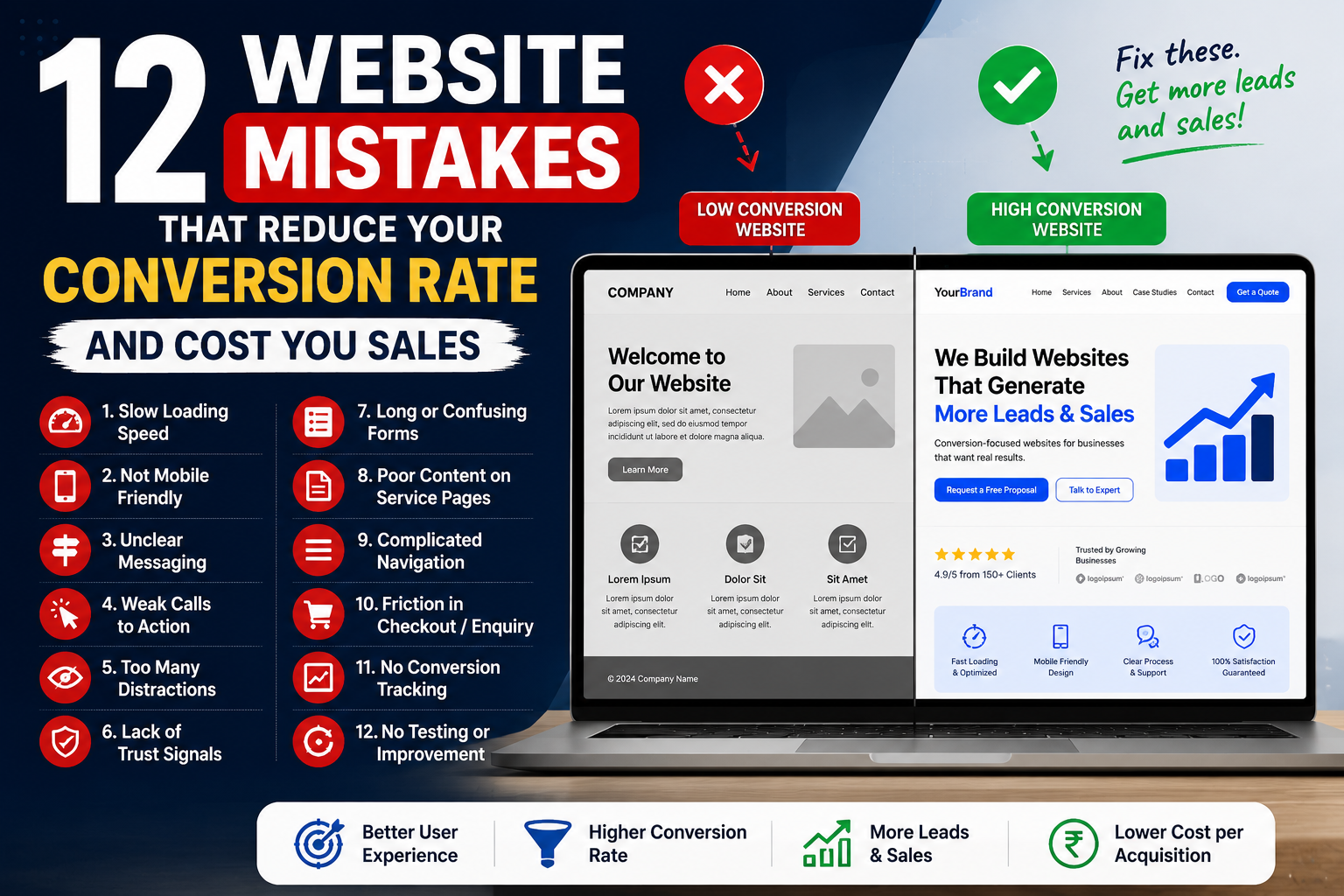
  • 12 Website Mistakes That Reduce Your Conversion Rate and Cost You Sales

    12 Website Mistakes That Reduce Your Conversion Rate and Cost You Sales

    Your website may be receiving traffic from Google, Meta Ads, social media, referrals or email campaigns—but traffic alone does not generate business growth.

    Visitors must take a meaningful action.

    That action may include:

    • Submitting an enquiry
    • Calling your business
    • Starting a WhatsApp conversation
    • Booking an appointment
    • Requesting a quotation
    • Purchasing a product
    • Registering for a service
    • Downloading a brochure

    The percentage of visitors who complete the desired action is known as the website conversion rate.

    A website may look modern and still fail to convert. Slow speed, weak messaging, poor mobile usability, unclear buttons and complicated forms can prevent interested visitors from becoming customers.

    This guide explains 12 common mistakes that reduce your website conversion rate and how to fix them.

    Table of Contents

    1. Your Website Loads Too Slowly
    2. Your Website Is Not Mobile-Friendly
    3. Your Headline Is Unclear
    4. Your Calls to Action Are Weak
    5. Your Website Has Too Many Distractions
    6. You Are Not Building Enough Trust
    7. Your Forms Are Too Long or Confusing
    8. Your Service and Product Pages Lack Detail
    9. Your Website Navigation Is Complicated
    10. Your Checkout or Enquiry Process Has Too Much Friction
    11. You Are Not Using Conversion Tracking
    12. You Are Not Testing or Improving the Website
    13. How to Measure Website Conversions
    14. How UpscaleEra Helps Improve Conversion Rates
    15. Frequently Asked Questions

    What Is a Website Conversion Rate?

    A website conversion rate is the percentage of visitors who complete a desired action.

    For example, if 1,000 people visit your website and 30 submit an enquiry, the conversion rate is 3%.

    Different businesses may track different conversions.

    Service Business Conversions

    • Contact-form submissions
    • Phone calls
    • WhatsApp enquiries
    • Appointment bookings
    • Quotation requests
    • Brochure downloads

    eCommerce Conversions

    • Product purchases
    • Add-to-cart actions
    • Checkout initiation
    • Email registrations
    • Repeat purchases
    • Subscription sign-ups

    B2B Conversions

    • Demo requests
    • Consultation bookings
    • Proposal requests
    • Lead-form submissions
    • Whitepaper downloads
    • Sales-meeting bookings

    Improving your website conversion rate does not always require more website traffic.

    Sometimes, fixing the existing customer journey can generate more leads or sales from the traffic you already receive.

    Why Website Conversion Rate Matters

    Consider two websites receiving the same amount of traffic.

    MetricWebsite AWebsite B
    Monthly visitors5,0005,000
    Conversion rate1%3%
    Leads or sales50150

    Website B generates three times more conversions without increasing traffic.

    A stronger conversion rate can help your business:

    • Generate more leads
    • Reduce advertising waste
    • Lower customer acquisition cost
    • Improve return on ad spend
    • Increase online sales
    • Improve sales-team efficiency
    • Get more value from SEO traffic
    • Scale campaigns more confidently

    This is why conversion-focused website development is as important as attracting visitors.

    1. Your Website Loads Too Slowly

    Website visitors expect pages to load quickly.

    When a page takes too long to open, users may leave before reading the headline, exploring the offer or submitting an enquiry.

    Website speed can be affected by:

    • Oversized images
    • Cheap or weak hosting
    • Heavy themes
    • Too many plugins
    • Unnecessary scripts
    • Large video backgrounds
    • Poor coding
    • No caching
    • Unoptimised databases
    • Third-party applications

    A slow website can reduce both user satisfaction and your website conversion rate.

    How to Fix It

    Improve performance by:

    • Compressing images
    • Using WebP or AVIF formats
    • Choosing reliable hosting
    • Enabling browser caching
    • Reducing unnecessary plugins
    • Removing unused scripts
    • Using lazy loading
    • Optimising fonts
    • Improving code quality
    • Testing mobile performance

    Do not judge speed only on desktop Wi-Fi.

    Test your website on a mobile device and a normal mobile-data connection.

    2. Your Website Is Not Mobile-Friendly

    A website can look excellent on a large desktop screen and still be difficult to use on mobile.

    Common mobile problems include:

    • Small text
    • Tiny buttons
    • Overlapping sections
    • Cut-off images
    • Horizontal scrolling
    • Difficult forms
    • Slow menus
    • Pop-ups covering the screen
    • Complicated checkout
    • Buttons placed too close together

    Visitors arriving from Instagram, Facebook, WhatsApp and mobile Google searches usually expect a smooth mobile experience.

    A mobile-friendly website should not simply shrink the desktop layout. The complete user journey should be planned for smaller screens.

    How to Fix It

    Check whether:

    • Text is readable
    • Buttons are easy to tap
    • Menus open correctly
    • Forms are simple
    • Phone numbers are clickable
    • WhatsApp buttons work
    • Images resize properly
    • Product pages are easy to browse
    • Checkout is smooth
    • Key information appears early

    A conversion-focused website should make it easy for mobile users to take action with minimal effort.

    3. Your Headline Is Unclear

    The first headline should help visitors immediately understand:

    • What you offer
    • Who it is for
    • What benefit they receive
    • What they should do next

    Weak headline:

    Welcome to Our Website

    This does not communicate the service or value.

    Stronger headline:

    Conversion-Focused Shopify and WordPress Websites for Growing Businesses

    Another example:

    Generate More Qualified Leads With Performance Marketing and High-Converting Landing Pages

    A clear headline can improve the website conversion rate because visitors understand the offer without searching through the full page.

    How to Fix It

    Write headlines that include:

    • The customer
    • The problem
    • The solution
    • The main benefit
    • A relevant differentiator

    Avoid vague statements such as:

    • We Create Excellence
    • Your Partner in Success
    • Welcome to Our World
    • Building Better Futures

    These phrases may sound professional but do not clearly explain what the business does.

    4. Your Calls to Action Are Weak

    A call to action tells visitors what to do next.

    Common calls to action include:

    • Book a Consultation
    • Request a Quotation
    • Call Now
    • Start a WhatsApp Chat
    • Shop Now
    • Schedule an Appointment
    • Get a Free Audit
    • View Available Packages
    • Download the Brochure

    Weak calls to action include:

    Click Here
    Submit
    Learn More

    These are not always wrong, but they may not clearly communicate the result of clicking.

    How to Fix It

    Use specific action-led buttons such as:

    Book Your Free Consultation
    Request a Website Proposal
    Talk to a Marketing Expert
    Check Product Availability

    Place important calls to action:

    • Near the top of the page
    • After key benefits
    • Near testimonials
    • At the end of service sections
    • At the bottom of the page

    Do not use five different primary actions on the same page. Identify the most important conversion goal.

    5. Your Website Has Too Many Distractions

    Adding more elements does not always create a better website.

    Too many banners, buttons, animations, colours and pop-ups can make the page confusing.

    Common distractions include:

    • Multiple pop-ups
    • Autoplay videos
    • Constant animations
    • Too many menu items
    • Several competing buttons
    • Large blocks of unrelated content
    • Excessive sliders
    • Flashing offers
    • Multiple notification bars

    When visitors do not know where to look, they may leave without taking action.

    How to Fix It

    Simplify the page.

    Each important page should have:

    • One clear goal
    • One primary call to action
    • Logical content order
    • Consistent visual style
    • Enough white space
    • Clear headings
    • Limited distractions

    A clean layout can improve your website conversion rate by making the customer journey easier to understand.

    6. You Are Not Building Enough Trust

    Customers may hesitate to submit an enquiry or complete a purchase when the website does not feel trustworthy.

    Important trust signals include:

    • Genuine customer reviews
    • Case studies
    • Client logos
    • Team information
    • Office address
    • Contact details
    • Professional email address
    • Certifications
    • Secure payment options
    • Privacy policy
    • Terms and conditions
    • Return or refund policy
    • Real product photographs
    • Clear company information

    For service businesses, visitors may want to see previous work and understand who will manage their project.

    For eCommerce businesses, customers may want clarity about shipping, payments, returns and customer support.

    How to Fix It

    Add trust signals near important conversion points.

    For example, beside an enquiry form, you can include:

    • Response time
    • Privacy assurance
    • Client count
    • Consultation process
    • Customer rating
    • Relevant certification

    Avoid fake testimonials, misleading counters or unsupported claims.

    Trust should be specific, genuine and easy to verify.

    7. Your Forms Are Too Long or Confusing

    Forms are one of the most important parts of the conversion journey.

    A form that asks too many questions can reduce submissions.

    A form that asks too few questions may generate poor-quality leads.

    The right length depends on:

    • Service value
    • Customer type
    • Sales process
    • Qualification requirements
    • Buying stage

    Basic Lead Form

    A basic form may request:

    • Name
    • Phone number
    • Email
    • Service required
    • Message

    Qualified Lead Form

    A more detailed form may request:

    • Business name
    • Website URL
    • Service requirement
    • Budget range
    • Timeline
    • Current challenge
    • Preferred contact method

    How to Fix It

    Use only the questions necessary for the next step.

    Also make sure:

    • Labels are clear
    • Error messages are understandable
    • Required fields are marked
    • The submit button is specific
    • Mobile fields are easy to complete
    • The confirmation message explains what happens next

    Instead of:

    Submit

    Use:

    Request My Consultation

    or:

    Send My Website Requirements

    8. Your Service or Product Pages Lack Detail

    Visitors need enough information to make a decision.

    A weak service page may include only:

    • A short paragraph
    • A generic image
    • A contact button

    A strong service page should explain:

    • The problem
    • The solution
    • Who the service is for
    • Benefits
    • Process
    • Deliverables
    • Timelines
    • Frequently asked questions
    • Relevant work
    • Next step

    A strong product page should include:

    • Product title
    • Clear images
    • Benefits
    • Features
    • Ingredients or specifications
    • Usage information
    • Shipping details
    • Reviews
    • Return information
    • Related products
    • Clear add-to-cart button

    How to Fix It

    Create pages based on customer questions.

    Ask:

    • What does the visitor need to know?
    • What objections might prevent action?
    • What proof can reduce uncertainty?
    • What happens after the enquiry or purchase?

    Detailed, well-structured content can improve both SEO and the website conversion rate.

    9. Your Website Navigation Is Complicated

    Visitors should be able to find important information without confusion.

    Navigation problems include:

    • Too many menu items
    • Unclear labels
    • Important pages hidden
    • Broken links
    • Different menus on different pages
    • No search function
    • Complicated product categories
    • No mobile navigation plan

    How to Fix It

    Use clear menu labels such as:

    • Services
    • About
    • Portfolio
    • Pricing
    • Blog
    • Contact
    • Shop
    • Categories

    Avoid unclear labels such as:

    • Discover
    • Experience
    • Explore More
    • Our Universe

    These terms may be creative but can make navigation harder.

    For eCommerce websites, organise:

    • Products
    • Collections
    • Filters
    • Search
    • Cart
    • Account
    • Checkout

    A simple navigation structure can help visitors reach conversion pages faster.

    10. Your Checkout or Enquiry Process Has Too Much Friction

    Friction is anything that makes the customer journey harder than necessary.

    Examples include:

    • Creating an account before checkout
    • Unexpected delivery charges
    • Too many checkout steps
    • Limited payment methods
    • Complicated enquiry forms
    • Broken coupon codes
    • Slow payment pages
    • No confirmation message
    • No guest checkout
    • Unclear return policy
    • Repeated information requests

    Every unnecessary step can reduce conversions.

    How to Fix It

    For eCommerce websites:

    • Offer guest checkout
    • Show shipping charges clearly
    • Provide trusted payment options
    • Reduce unnecessary fields
    • Display delivery information
    • Keep cart totals visible
    • Test checkout on mobile

    For service websites:

    • Keep forms simple
    • Add call and WhatsApp options
    • Confirm successful submission
    • Explain response time
    • Allow appointment scheduling
    • Avoid asking for information twice

    Improving these steps can increase the website conversion rate without increasing advertising spend.

    11. You Are Not Using Conversion Tracking

    Without tracking, you may know how many people visited the website but not what they did.

    Important conversions may include:

    • Form submissions
    • Phone-number clicks
    • WhatsApp clicks
    • Appointment bookings
    • Product purchases
    • Add-to-cart events
    • Checkout initiation
    • File downloads
    • Email sign-ups

    Useful tracking tools may include:

    • Google Analytics 4
    • Google Tag Manager
    • Google Search Console
    • Meta Pixel
    • Meta Conversion API
    • Google Ads conversion tracking
    • Shopify analytics
    • CRM systems

    How to Fix It

    Create a tracking plan before running advertisements.

    For each important action, define:

    • Event name
    • Page
    • Platform
    • Value
    • Source
    • Reporting method

    Do not rely only on button-click counts.

    Where possible, connect website data with qualified leads, sales and revenue.

    12. You Are Not Testing and Improving the Website

    A website should not remain unchanged for years.

    Customer behaviour, devices, competitors and marketing channels continue to change.

    Conversion optimisation may involve testing:

    • Headlines
    • Calls to action
    • Form length
    • Page layout
    • Testimonials
    • Product images
    • Offers
    • Pricing presentation
    • Checkout flow
    • Mobile design
    • Page speed

    How to Fix It

    Review website performance regularly.

    Check:

    • Which pages receive traffic?
    • Where do visitors leave?
    • Which forms perform best?
    • Which devices convert?
    • Which traffic sources generate customers?
    • Which pages are slow?
    • Which buttons receive clicks?
    • Which products are abandoned?

    Use real data rather than changing the website based only on personal preference.

    Continuous improvement is essential for a stronger website conversion rate.

    How to Measure Website Conversion Performance

    Track these metrics:

    MetricWhat It Shows
    Website visitorsTotal traffic
    Conversion ratePercentage completing the desired action
    Form-completion rateForm submissions compared with visitors
    Add-to-cart rateVisitors adding products to cart
    Checkout completion rateCheckouts converted into purchases
    Bounce or engagement dataWhether visitors interact with the page
    Cost per conversionMarketing cost for each action
    Customer acquisition costCost of acquiring a customer
    Revenue per visitorRevenue generated from traffic
    Mobile conversion ratePerformance on mobile devices

    Compare conversion rates by:

    • Device
    • Traffic source
    • Landing page
    • Location
    • Campaign
    • Product
    • Service
    • New and returning users

    A single overall percentage may hide important differences.

    Website Conversion Rate Improvement Checklist

    Use this checklist before launching or redesigning a website:

    • Website loads quickly
    • Mobile layout works correctly
    • Headline explains the offer
    • Main CTA is visible
    • Contact details are easy to find
    • Forms are tested
    • WhatsApp button works
    • Phone link works
    • Service pages are detailed
    • Product pages answer key questions
    • Reviews are visible
    • Trust signals are genuine
    • Checkout works on mobile
    • Analytics is connected
    • Conversion events are configured
    • Confirmation messages work
    • Privacy policy is available
    • Links are not broken
    • Images are compressed
    • Website is regularly reviewed

    How UpscaleEra Helps Improve Website Conversion Rates

    UpscaleEra develops conversion-focused websites, Shopify stores, WordPress websites and landing pages designed to support measurable business goals.

    The process can include:

    • Website audit
    • User journey planning
    • Conversion-focused design
    • WordPress development
    • Shopify development
    • WooCommerce development
    • Landing-page development
    • Mobile optimisation
    • Speed optimisation
    • Form development
    • WhatsApp integration
    • Analytics setup
    • Meta Pixel integration
    • Google Ads tracking
    • Conversion-rate optimisation

    Explore UpscaleEra’s website development services:

    https://upscaleera.com/website-development/

    Businesses planning to drive traffic through advertising can also explore:

    https://upscaleera.com/performance-marketing/

    For social media and demand-generation support:

    https://upscaleera.com/social-media-marketing/

    Final Thoughts

    A low website conversion rate is not always caused by poor traffic.

    The problem may exist in:

    • Website speed
    • Mobile usability
    • Headline clarity
    • Calls to action
    • Page design
    • Trust
    • Forms
    • Product information
    • Checkout
    • Tracking
    • Follow-up
    • Lack of testing

    Before spending more money on advertising, review whether the website is prepared to convert additional visitors.

    A strong website should make it easy for users to:

    • Understand your offer
    • Trust your business
    • Find relevant information
    • Take the next step
    • Complete the conversion

    Improving the customer journey can generate more business from the same amount of traffic.

    Ready to Improve Your Website Conversion Rate?

    Is your website receiving traffic but not generating enough enquiries or sales?

    Use the anchor text:

    Request a website conversion audit

    Link it to:

    https://upscaleera.com/contact/

    UpscaleEra can review your website speed, mobile experience, calls to action, forms, landing pages, tracking and conversion journey.

    Frequently Asked Questions

    What is a good website conversion rate?

    There is no universal conversion rate that applies to every business. It depends on the industry, traffic source, customer intent, offer, website type and conversion goal. Compare your website against its own historical performance and business profitability.

    How can I improve my website conversion rate?

    Improve page speed, mobile usability, headlines, calls to action, trust signals, forms, service information, checkout and conversion tracking. Use website data to identify the biggest problem areas.

    Why is my website getting traffic but no leads?

    Visitors may not understand the offer, trust the business or know what to do next. Slow loading, weak calls to action, complicated forms and irrelevant traffic can also reduce leads.

    Does website speed affect conversions?

    Yes. Slow-loading pages can cause visitors to leave before viewing the offer or completing an enquiry or purchase.

    Should I use a long or short enquiry form?

    Use the shortest form that still collects the information needed for the next sales step. High-value or complex services may require more qualification than lower-cost services.

    Why do customers abandon checkout?

    Common causes include unexpected charges, complicated checkout, limited payment options, forced account creation, slow pages and unclear delivery or return information.

    How often should I optimise my website?

    Review website performance regularly and after major marketing campaigns, redesigns, platform updates or changes in customer behaviour.
  • Google Ads vs Meta Ads: Which Is Better for Your Business in 2026?

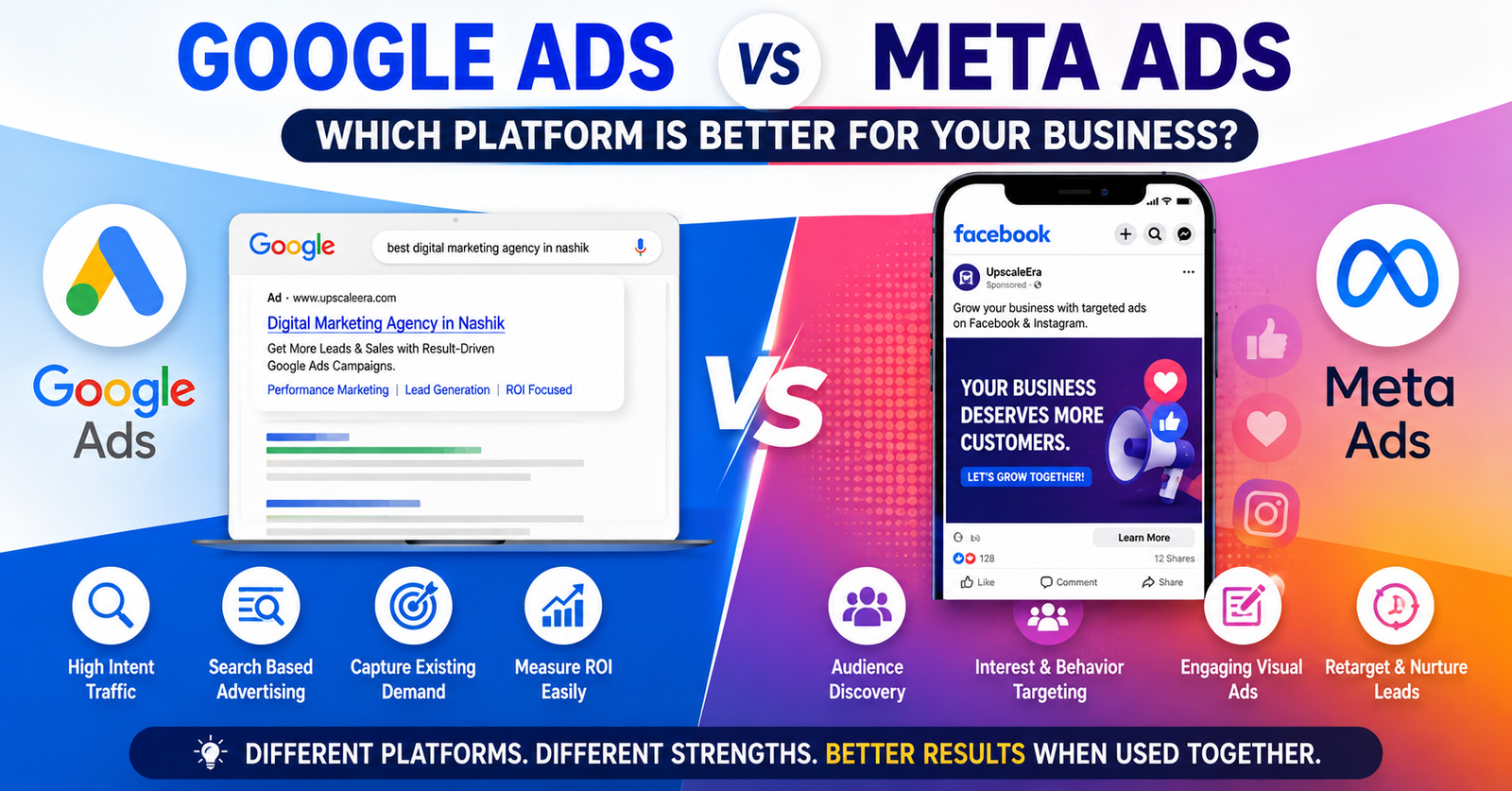
    Google Ads vs Meta Ads: Which Is Better for Your Business in 2026?

    Choosing between Google Ads vs Meta Ads is one of the most common decisions businesses face when planning a paid advertising strategy.

    Both platforms can generate website traffic, enquiries, purchases, appointments and brand awareness. However, they reach customers in different situations.

    Google Ads is especially useful when people are actively searching for a product, service or solution. Meta Ads helps businesses reach and influence audiences across platforms such as Facebook and Instagram, even when those users are not actively searching at that moment.

    Google explains that Search campaigns can show advertisements to people who are actively looking online for specific products and services. Meta’s advertising system, meanwhile, uses the selected campaign objective to find people across its platforms who are more likely to complete the desired action.

    The right choice depends on your business model, customer behaviour, offer, advertising budget and sales process.

    This complete Google Ads vs Meta Ads comparison will help you understand the strengths, limitations and ideal uses of each platform.

    Table of Contents

    1. What Is Google Ads?
    2. What Is Meta Ads?
    3. Google Ads vs Meta Ads: Quick Comparison
    4. Customer Intent
    5. Audience Targeting
    6. Advertising Formats
    7. Creative Requirements
    8. Costs and Budget
    9. Lead Quality
    10. Conversion Speed
    11. Tracking and Measurement
    12. Retargeting
    13. eCommerce Advertising
    14. Local Business Advertising
    15. Which Platform Should You Choose?
    16. Why Using Both Can Work Better
    17. Common Advertising Mistakes
    18. How UpscaleEra Can Help
    19. Frequently Asked Questions

    What Is Google Ads?

    Google Ads is Google’s online advertising platform.

    Businesses can use it to promote products and services across:

    • Google Search
    • Google Maps
    • YouTube
    • Display websites
    • Shopping listings
    • Mobile applications
    • Google partner properties

    Google Search campaigns help businesses reach users when they search for relevant keywords.

    For example:

    dentist in Nashik
    website development company in Nashik
    digital marketing agency near me
    buy skincare products online
    best interior designer in Nashik

    Google states that Search campaigns can support goals such as sales, leads and website traffic by reaching people searching for relevant products or services.

    Google Ads campaign types may include:

    • Search campaigns
    • Display campaigns
    • Shopping campaigns
    • Video campaigns
    • App campaigns
    • Demand Gen campaigns
    • Performance Max campaigns

    The most suitable campaign type depends on what your business sells and how customers discover it.

    What Is Meta Ads?

    Meta Ads is the advertising system used to promote businesses across Meta-owned platforms and placements.

    These may include:

    • Facebook
    • Instagram
    • Messenger
    • Reels
    • Stories
    • Feeds
    • Audience Network
    • WhatsApp-related conversion destinations where available

    Meta Ads can help businesses generate:

    • Brand awareness
    • Website traffic
    • Engagement
    • Messages
    • Leads
    • App activity
    • Product sales

    Meta explains that advertisers select an objective based on their business goal. Its auction system then looks for people who are more likely to take the action associated with that objective.

    Meta Ads is often effective when visual communication, audience discovery and repeated exposure are important.

    Google Ads vs Meta Ads: Quick Comparison

    AreaGoogle AdsMeta Ads
    Primary strengthCapturing existing demandCreating and influencing demand
    User behaviourOften actively searchingBrowsing social content
    TargetingKeywords, intent, location and audiencesInterests, behaviour, demographics and audience data
    Main formatsSearch, Shopping, Display and videoFeed, Stories, Reels, video, carousel and lead forms
    Creative dependencyModerate for Search; high for visual campaignsVery high
    Best forHigh-intent searches and direct demandDiscovery, awareness, visual products and retargeting
    Lead qualityOften higher intentDepends heavily on qualification
    Cost structureAuction-basedAuction-based
    Content requiredHeadlines, descriptions, images or videosStrong visual creatives and copy
    Buying stageOften middle or bottom funnelCan cover top, middle and bottom funnel

    The Google Ads vs Meta Ads decision should be based on where your customers are in their buying journey.

    1. Google Ads vs Meta Ads for Customer Intent

    Customer intent is one of the most important differences between the two platforms.

    Google Ads

    A user searching for:

    emergency dentist in Nashik
    Shopify developer in Nashik
    buy organic baby massage oil
    performance marketing agency near me

    is actively expressing a need.

    They may already understand their problem and be comparing providers or products.

    This makes Google Search particularly valuable for:

    • Urgent services
    • Local professionals
    • High-intent purchases
    • B2B services
    • Appointment-based businesses
    • Customers searching for specific solutions

    Meta Ads

    A person browsing Instagram or Facebook may not be actively searching for your service.

    Your advertisement must interrupt their browsing experience and create interest.

    Meta Ads can be effective when:

    • Customers are not yet aware of the product
    • Visual demonstration matters
    • The business needs to create demand
    • The buying decision requires education
    • The product has lifestyle appeal
    • Repeated exposure improves trust

    Verdict

    Choose Google Ads when customers are already searching.

    Choose Meta Ads when you need to introduce, educate or persuade audiences.

    2. Audience Targeting

    Google Ads Targeting

    Google Ads targeting may include:

    • Search keywords
    • Geographic locations
    • Languages
    • Devices
    • Demographics
    • Customer lists
    • Website visitors
    • In-market audiences
    • Remarketing audiences
    • Placement and topic targeting

    Search ads are influenced by the relationship between a person’s query, campaign keywords and other factors such as location targeting and bids.

    Meta Ads Targeting

    Meta Ads targeting may include:

    • Location
    • Age
    • Language
    • Interests
    • Behaviour
    • Custom audiences
    • Website visitors
    • Social media engagement
    • Customer lists
    • Lookalike audiences
    • Advantage+ audiences

    Meta allows advertisers to define important constraints such as location, language and age while its automated audience systems may expand beyond suggestions when they predict better performance.

    Verdict

    Google is strong for keyword and search-intent targeting.

    Meta is strong for audience discovery, social behaviour and visual interest-based targeting.

    3. Advertising Formats

    The two platforms offer different creative environments.

    Google Ads Formats

    Google advertising formats include:

    • Text-based Search ads
    • Product Shopping ads
    • Display banners
    • YouTube video ads
    • Responsive ads
    • Local and Maps-related placements
    • Performance Max assets

    Google Search advertisements can work without highly produced visual assets, although strong copy and landing pages remain important.

    Meta Ads Formats

    Meta advertising formats include:

    • Single-image ads
    • Video ads
    • Carousel ads
    • Reels ads
    • Stories ads
    • Collection ads
    • Instant Experience
    • Lead-form ads
    • Click-to-message ads

    Meta allows advertisements to appear across placements such as Facebook, Instagram and Messenger.

    Verdict

    Google Search is useful when customer intent and written messaging are more important than visual storytelling.

    Meta is useful when products, transformations, emotions or demonstrations can be communicated visually.

    4. Creative Requirements

    Creative quality affects both platforms, but it is especially important on Meta.

    Google Search Creatives

    A Search advertisement needs:

    • Relevant headlines
    • Clear descriptions
    • Strong keyword alignment
    • Useful assets
    • A clear offer
    • A relevant landing page
    • A direct call to action

    Examples of calls to action include:

    Book an Appointment
    Request a Quote
    Shop Online
    Call Now
    Schedule a Consultation

    Meta Creatives

    A Meta advertisement should capture attention quickly.

    Strong Meta creatives commonly include:

    • A clear opening hook
    • A visible customer problem
    • Product or service benefits
    • Demonstration
    • Social proof
    • Offer
    • Strong call to action

    Meta creative formats should be adapted for placements such as Reels, Stories and Feeds.

    Verdict

    Google Search relies more heavily on keywords, written relevance and landing-page quality.

    Meta depends heavily on visual storytelling, hooks and frequent creative testing.

    5. Google Ads vs Meta Ads Costs

    There is no fixed universal cost for either platform.

    Advertising costs can be influenced by:

    • Industry competition
    • Target location
    • Audience size
    • Campaign objective
    • Advertisement quality
    • Landing-page performance
    • Conversion data
    • Seasonality
    • Budget
    • Bidding strategy

    Both Google and Meta use auction systems.

    A lower cost per click or lead does not automatically mean better business results.

    You should compare:

    • Cost per qualified lead
    • Cost per appointment
    • Customer acquisition cost
    • Revenue
    • Return on advertising spend
    • Lead-to-sale conversion rate

    Meta explains that advertising costs depend partly on the selected budget, schedule and auction conditions.

    Verdict

    Meta may sometimes generate lower-cost traffic or lead submissions.

    Google Search may sometimes produce higher-cost but stronger-intent enquiries.

    The best platform is the one that produces profitable customers, not simply cheap clicks.

    6. Lead Quality

    Lead quality depends on more than the advertising platform.

    It is affected by:

    • Targeting
    • Keywords
    • Advertisement copy
    • Creative
    • Offer
    • Form questions
    • Landing page
    • Pricing
    • Follow-up speed
    • Sales process

    Google Ads Lead Quality

    Google Search leads may have stronger immediate intent because the user is actively searching.

    However, irrelevant leads can still appear when:

    • Keyword matching is too broad
    • Negative keywords are missing
    • Location settings are incorrect
    • The ad message is unclear
    • The landing page attracts the wrong audience

    Meta Ads Lead Quality

    Meta Ads may generate larger lead volume, but businesses must carefully qualify users.

    Lead quality can improve through:

    • Clear advertising copy
    • Budget or service qualifiers
    • Suitable form questions
    • Location restrictions
    • Conversion-focused landing pages
    • CRM feedback
    • Qualified-lead tracking

    Verdict

    Google Ads can be stronger for immediate search intent.

    Meta Ads can generate good-quality leads when the campaign includes effective qualification and follow-up.

    7. Conversion Speed

    Google Ads

    Google Search can produce conversions quickly when users already need the service.

    This may work especially well for:

    • Emergency services
    • Repairs
    • Healthcare appointments
    • Local professionals
    • High-intent B2B services
    • Product-specific searches

    Meta Ads

    Meta Ads may require more customer education.

    The user may:

    1. See the advertisement.
    2. Visit the website.
    3. Watch another video.
    4. Read customer reviews.
    5. See a retargeting advertisement.
    6. Submit an enquiry.
    7. Make a purchase later.

    Verdict

    Google can capture customers who are closer to purchasing.

    Meta can influence users earlier and build demand over time.

    8. Tracking and Measurement

    Both platforms require accurate conversion tracking.

    Google Ads Tracking

    Businesses may track:

    • Form submissions
    • Phone calls
    • Purchases
    • Bookings
    • Downloads
    • Store actions
    • Revenue
    • Website events

    Google Ads allows advertisers to monitor campaign metrics and optimise campaigns based on performance data.

    Meta Ads Tracking

    Businesses may use:

    • Meta Pixel
    • Conversion API
    • Website events
    • Lead-form submissions
    • App events
    • Offline conversion data
    • CRM integration

    Shared Tracking Tools

    A complete setup may include:

    • Google Analytics 4
    • Google Tag Manager
    • CRM
    • Shopify or WooCommerce tracking
    • Call tracking
    • WhatsApp tracking
    • Sales dashboards

    Verdict

    Neither platform should be scaled without reliable conversion tracking.

    Track the complete path from advertisement to customer.

    9. Retargeting Capabilities

    Both Google and Meta support retargeting.

    Google Retargeting

    Businesses can reach users who:

    • Visited the website
    • Viewed products
    • Abandoned checkout
    • Watched YouTube content
    • Previously interacted with the business

    Meta Retargeting

    Businesses can reach users who:

    • Visited the website
    • Engaged with Instagram or Facebook
    • Watched a video
    • Opened a lead form
    • Added products to cart
    • Viewed specific pages
    • Interacted with a catalogue

    Verdict

    Meta retargeting is often strong for visual reminders and social proof.

    Google retargeting can help businesses remain visible across Search, Display, YouTube and other eligible placements.

    Using both can increase the number of meaningful customer touchpoints.

    10. Google Ads vs Meta Ads for eCommerce

    Google Ads for eCommerce

    Google can help capture product demand through:

    • Shopping campaigns
    • Search campaigns
    • Performance Max
    • Brand searches
    • Product-specific keywords
    • Remarketing

    It is useful when customers already know what they want.

    Meta Ads for eCommerce

    Meta can help eCommerce brands through:

    • Product discovery
    • Reels
    • User-generated content
    • Product demonstrations
    • Catalogue advertising
    • Retargeting
    • Lifestyle marketing
    • Offer-led campaigns

    Automated Meta sales campaigns use machine learning to serve advertisements to audiences predicted to be more likely to convert.

    Verdict

    Google can capture existing product demand.

    Meta can create interest and introduce products to new audiences.

    Many eCommerce brands benefit from using both.

    11. Google Ads vs Meta Ads for Local Businesses

    Google Ads may be particularly valuable for local businesses when users search for nearby services.

    Examples include:

    • Clinics
    • Salons
    • Restaurants
    • Repair services
    • Consultants
    • Real estate businesses
    • Coaching institutes
    • Home-service providers

    Meta Ads can help local businesses:

    • Build awareness
    • Promote offers
    • Announce events
    • Showcase transformations
    • Generate WhatsApp enquiries
    • Retarget local audiences
    • Build social proof

    Verdict

    Use Google Ads for high-intent local searches.

    Use Meta Ads for awareness, offers, visual storytelling and repeated exposure.

    Which Platform Should Your Business Choose?

    Choose Google Ads When:

    • Customers actively search for your service
    • You sell a solution to an immediate problem
    • Search demand already exists
    • Keyword intent is strong
    • You need calls or enquiries
    • You operate a local service business
    • Customers compare providers on Google
    • Your website has strong landing pages

    Choose Meta Ads When:

    • Your product benefits from visual demonstration
    • You need to create demand
    • Your customers spend time on Instagram or Facebook
    • You want video-led advertising
    • You sell lifestyle or D2C products
    • You want lead-form or WhatsApp campaigns
    • You have strong creative assets
    • You want to build awareness and retarget audiences

    Use Both When:

    • You want to capture demand and create demand
    • Customers require multiple touchpoints
    • You sell products online
    • You need both short-term leads and long-term growth
    • You want cross-platform retargeting
    • You have enough budget for meaningful testing

    Why Google Ads and Meta Ads Work Better Together

    The Google Ads vs Meta Ads question does not always require choosing only one platform.

    A connected journey may look like this:

    1. A person discovers your product through an Instagram Reel ad.
    2. They visit your website but do not purchase.
    3. They later search your brand on Google.
    4. Your Google Search advertisement appears.
    5. The person visits the product page again.
    6. They see a Meta retargeting advertisement with a testimonial.
    7. They complete the purchase.

    In this journey:

    • Meta created awareness.
    • Google captured active intent.
    • Retargeting reinforced trust.
    • The website converted the customer.

    This is why attribution should not be judged using only the last click.

    Common Google Ads Mistakes

    Using Broad Keywords Without Control

    Review search terms and add negative keywords.

    Sending All Traffic to the Homepage

    Use relevant service or product landing pages.

    Ignoring Location Settings

    Target only areas your business can serve.

    No Conversion Tracking

    Do not optimise only for clicks.

    Weak Advertisement Copy

    Make the offer and value proposition clear.

    Ignoring Mobile Users

    Forms, calls and checkout should work smoothly on mobile.

    Common Meta Ads Mistakes

    Using Generic Creatives

    Create advertisements for specific audiences and problems.

    Using the Same Creative for Too Long

    Test new hooks, formats and messages regularly.

    Asking Too Few Qualifying Questions

    Very short forms may reduce lead quality.

    Slow Sales Follow-Up

    Assign leads quickly and use an organised follow-up process.

    Optimising Only for Cheap Leads

    Track qualified leads, sales and revenue.

    Making Frequent Major Changes

    Meta notes that ad sets pass through a learning phase while its system explores effective audiences and placements. Frequent structural changes can make stable evaluation more difficult.

    How to Measure Google Ads vs Meta Ads Performance

    Compare both platforms using the same business metrics.

    MetricWhat It Measures
    Advertising spendTotal media investment
    ClicksTraffic generated
    LeadsTotal enquiries
    Qualified leadsRelevant opportunities
    Cost per qualified leadCost of acquiring a suitable prospect
    AppointmentsMeetings or bookings generated
    SalesCustomers acquired
    Customer acquisition costCost per new customer
    RevenueIncome attributed to campaigns
    Return on ad spendRevenue compared with advertising spend

    Do not compare a Google click directly with a Meta impression.

    Compare the business outcomes produced by each platform.

    How UpscaleEra Helps Businesses Choose the Right Advertising Platform

    UpscaleEra is a Nashik-based digital growth agency offering performance marketing, social media marketing, content support and conversion-focused website development. Its website currently presents services covering performance marketing, social media, content, automation and web development.

    The UpscaleEra team can help with:

    • Advertising strategy
    • Customer research
    • Google Ads
    • Meta Ads
    • Audience targeting
    • Keyword research
    • Creative development
    • Landing pages
    • Conversion tracking
    • Meta Pixel
    • Google Analytics
    • Retargeting
    • Lead-quality reporting
    • Campaign optimisation

    UpscaleEra also develops conversion-focused WordPress websites, Shopify stores and marketing landing pages with analytics and advertising integrations.

    Final Thoughts

    The main difference in Google Ads vs Meta Ads is customer intent.

    Google Ads is powerful when people are actively searching for a product, service or solution.

    Meta Ads is powerful when businesses need to create demand, influence audiences, demonstrate products and build repeated exposure.

    Choose Google Ads when:

    • Search intent is strong
    • Customers need an immediate solution
    • You want to capture existing demand

    Choose Meta Ads when:

    • Visual storytelling matters
    • You need to reach new audiences
    • You want to generate awareness and demand

    Use both when your customers require multiple interactions before converting.

    The strongest advertising strategy is not based on assumptions. It is based on accurate tracking, controlled testing and actual sales data.

    Ready to Choose the Right Advertising Platform?

    Unsure whether Google Ads, Meta Ads or a combination of both is right for your business?

    Speak with the UpscaleEra team to review your audience, offer, budget, website and growth objectives.

    Use the anchor text:

    Request a performance marketing consultation

    Link it to:

    https://upscaleera.com/contact/

    Frequently Asked Questions

    Is Google Ads better than Meta Ads?

    Google Ads may be better when customers actively search for your product or service. Meta Ads may be better for product discovery, visual storytelling, audience building and demand generation. The right platform depends on your goals.

    Which platform generates better-quality leads?

    Google Search may generate stronger-intent leads because users are actively searching. Meta can also generate qualified leads when targeting, creative messaging, form questions and follow-up are properly managed.

    Is Meta Ads cheaper than Google Ads?

    Meta may sometimes generate lower-cost clicks or form submissions, while competitive Google keywords may cost more. However, businesses should compare customer acquisition cost and revenue rather than only cost per click or lead.

    Which platform is better for small businesses?

    Local service businesses may benefit from Google Search because customers often search for nearby solutions. Product, lifestyle and visual businesses may benefit from Meta. Some small businesses should use both with controlled budgets.

    Which platform is better for eCommerce?

    Google can capture people searching for specific products, while Meta can introduce products through visual creatives and retargeting. Many eCommerce brands use both platforms together.

    Can I run Google Ads and Meta Ads at the same time?

    Yes. Using both can help create demand, capture search intent and retarget interested users across different stages of the customer journey.

    How much should I spend on Google Ads or Meta Ads?

    The budget depends on industry competition, customer value, location, campaign objective and expected conversion rate. Begin with a sustainable testing budget and scale only after confirming lead or sales quality.

  • Meta Ads Getting Leads but No Sales? 12 Reasons and How to Fix Them

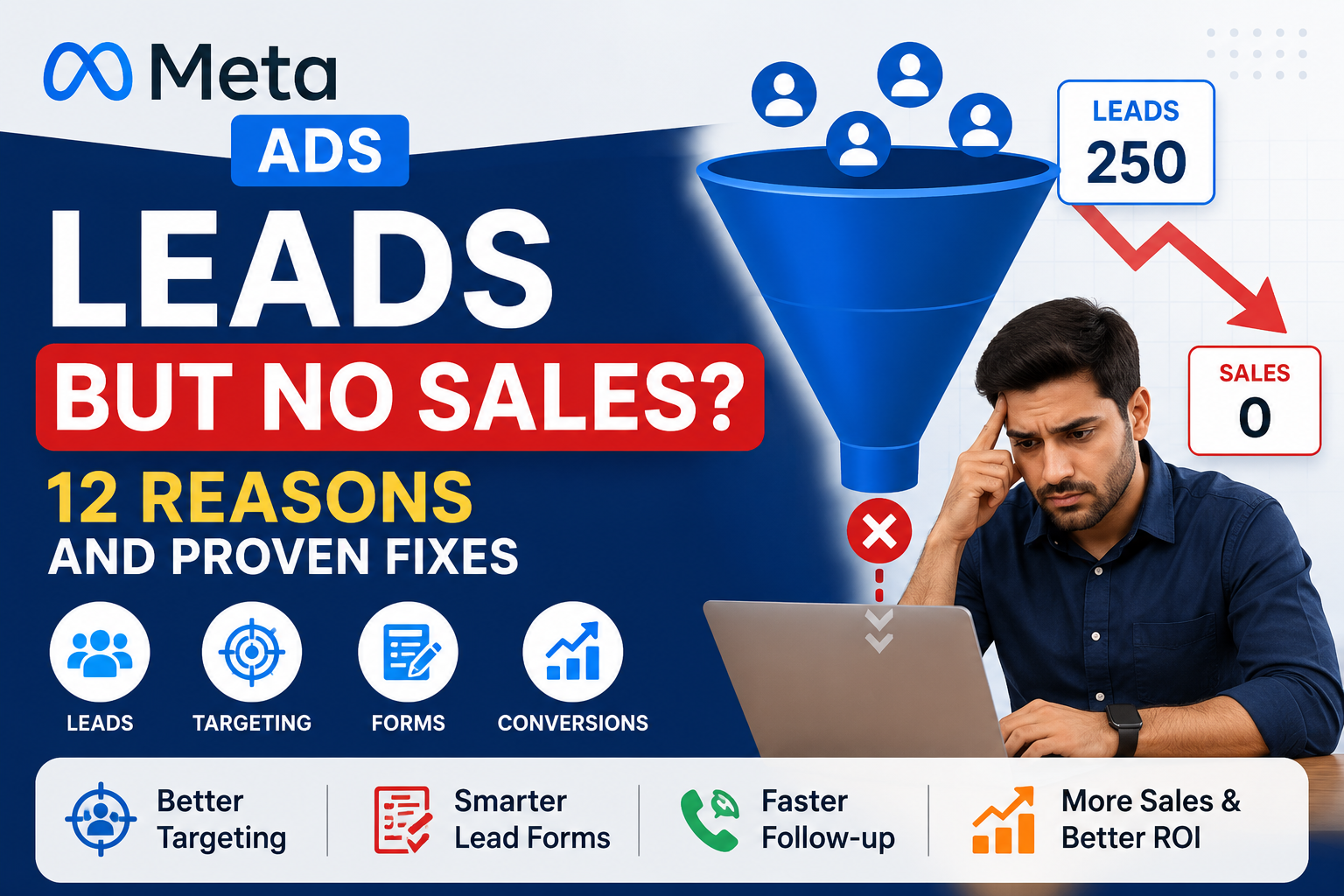
    Meta Ads Getting Leads but No Sales? 12 Reasons and How to Fix Them

    You launch a Meta Ads campaign, enquiries begin arriving and the cost per lead looks promising.

    But after a few days, your sales team reports that the leads are irrelevant, unresponsive, outside your service area or not ready to purchase.

    This is one of the most common challenges businesses face: Meta Ads leads but no sales.

    Generating form submissions is only the first stage of a successful campaign. The real objective is to attract suitable prospects, contact them quickly, qualify them properly and convert them into paying customers.

    Meta provides several lead-generation formats, including instant forms, website forms, messaging and calling. However, choosing a lead objective does not automatically guarantee high-quality customers. Campaign performance still depends on your offer, targeting, creative, form, website, tracking and sales process. Meta’s own guidance explains that lead campaigns work better when the platform understands what a successful conversion looks like for the business.

    This guide explains why your business may be getting Meta Ads leads but no sales and how to build a stronger lead-to-customer system.

    Table of Contents

    1. You Are Optimising for Form Submissions
    2. Your Targeting Is Too Broad or Too Narrow
    3. Your Advertisement Attracts the Wrong Audience
    4. Your Offer Attracts Freebie Seekers
    5. Your Lead Form Is Too Easy
    6. Your Form Is Too Complicated
    7. Your Landing Page Does Not Build Trust
    8. Your Sales Team Follows Up Too Slowly
    9. Your Follow-Up Process Is Weak
    10. You Are Measuring Cost per Lead Only
    11. Your Tracking Is Incomplete
    12. Marketing and Sales Are Not Connected
    13. How to Improve Meta Ads Lead Quality
    14. How UpscaleEra Can Help
    15. Frequently Asked Questions

    Why Meta Ads Leads Do Not Always Become Sales

    Meta’s advertising system tries to find people who are likely to complete the action connected to your selected campaign objective.

    If your campaign is optimised for basic lead submissions, the platform may find people who frequently fill out forms. Those people are not necessarily the users most likely to become paying customers.

    This creates an important difference between:

    • A form submission
    • A contacted lead
    • A qualified lead
    • An appointment
    • A sales opportunity
    • A paying customer

    A campaign can generate a low cost per lead while still producing a high customer acquisition cost.

    For example:

    Total leads generated: 200
    Qualified leads: 30
    Sales completed: 5

    The campaign did not truly generate 200 valuable opportunities. It generated 30 qualified opportunities and five customers.

    When you experience Meta Ads leads but no sales, you need to analyse the complete customer journey rather than only the advertising dashboard.

    1. You Are Optimising Only for Form Submissions

    The first problem may be your campaign objective and conversion event.

    When a campaign is optimised for the easiest possible form completion, Meta looks for users likely to complete that action.

    This can increase lead volume but may reduce purchase intent.

    A stronger setup should help Meta understand which leads become valuable customers.

    Depending on your business and technical setup, this may include:

    • Sending qualified-lead data back to Meta
    • Uploading offline conversion events
    • Connecting a CRM
    • Using Conversion API
    • Tracking appointments
    • Tracking purchases
    • Recording lead stages
    • Optimising toward higher-value outcomes

    Meta states that conversion-lead campaigns work best when it can understand what a successful conversion looks like for your business.

    How to Fix It

    Define your lead stages clearly:

    New Lead → Contacted → Qualified → Meeting Booked → Proposal Sent → Customer

    Then connect campaign reporting with actual sales outcomes.

    Do not judge the campaign only by the number of submitted forms.

    2. Your Targeting Is Too Broad or Too Narrow

    Poor audience targeting can generate Meta Ads leads but no sales.

    Targeting That Is Too Broad

    A broad audience may include people who:

    • Are outside your service area
    • Cannot afford your product
    • Do not match your ideal customer
    • Are interested in the topic but not ready to buy
    • Have no decision-making authority

    Targeting That Is Too Narrow

    Overly narrow targeting can also create problems.

    It may:

    • Restrict Meta’s delivery system
    • Increase advertising costs
    • Reduce opportunities for campaign learning
    • Repeatedly reach the same users
    • Limit the campaign’s ability to find converters

    Meta recommends selecting targeting according to genuine business constraints instead of unnecessarily restricting delivery. Its system uses the campaign objective and audience signals to find people more likely to take the requested action.

    How to Fix It

    Use essential restrictions only, such as:

    • Serviceable location
    • Suitable age range
    • Necessary language
    • Relevant business type
    • Existing customer exclusions
    • Employee exclusions

    Then test:

    • Broad audiences
    • Interest-based audiences
    • Website visitors
    • Engaged social audiences
    • Customer lookalikes
    • Qualified-lead lookalikes

    Do not depend on one audience for every campaign.

    3. Your Advertisement Attracts the Wrong Audience

    Sometimes the targeting is correct, but the advertisement attracts unsuitable people.

    Generic copy such as:

    Grow Your Business Today

    can attract a broad audience without clarifying who the service is for.

    A stronger advertisement should communicate:

    • Who the offer is for
    • Which problem it solves
    • The expected result
    • Important conditions
    • Location
    • Price range where appropriate
    • The next step

    For example, instead of:

    Get a Professional Website

    use:

    Need a conversion-focused Shopify or WordPress website for your growing business? Book a consultation with our Nashik website-development team.

    This message provides greater context and naturally filters some irrelevant users.

    How to Fix It

    Mention relevant qualifiers inside the advertisement:

    • Location
    • Industry
    • Minimum budget
    • Product category
    • Service type
    • Customer profile
    • Purchase timeline

    The purpose is not to discourage every user. It is to attract more of the right users.

    4. Your Offer Attracts Freebie Seekers

    Offers such as “free consultation,” “free audit” or “free quotation” can generate strong response rates.

    However, they may also attract users who want free information without genuine buying intent.

    This often results in Meta Ads leads but no sales.

    The problem is not necessarily the word “free.” The problem is using an offer without enough qualification.

    Weak Offer

    Get a Free Marketing Plan

    Stronger Offer

    Request a Free 20-Minute Growth Consultation for Businesses Spending or Planning to Spend on Digital Marketing

    The second offer gives the prospect a clearer idea of who should apply.

    How to Fix It

    Build an offer around:

    • A specific customer
    • A clear problem
    • A defined deliverable
    • A suitable next step
    • A qualification requirement

    Examples include:

    • Website audit for active business websites
    • Advertising consultation for brands with a monthly media budget
    • Property site visit for buyers within a stated budget
    • Demo for companies with a defined operational requirement
    • Marketing consultation for registered businesses

    A strong offer should create value without attracting every possible user.

    5. Your Lead Form Is Too Easy

    Meta instant forms can make it easy for users to submit information.

    This convenience can increase volume, but forms that ask only for a name and phone number may generate accidental or low-intent submissions.

    Meta’s lead-form format is designed to reduce friction, including through prefilled information. Businesses can also use forms to ask qualifying questions and capture information relevant to the sales process.

    How to Fix It

    Add a small number of meaningful qualifying questions.

    Examples:

    Which service do you need?
    What is your estimated budget?
    Which city are you located in?
    When do you plan to start?
    Are you the business owner or decision-maker?
    What is your primary requirement?

    Use multiple-choice questions where possible.

    Avoid asking unnecessary questions that do not help the sales team.

    6. Your Lead Form Is Too Complicated

    While extremely short forms may reduce lead quality, extremely long forms may reduce conversion volume.

    A form with 15–20 questions can discourage serious prospects, especially on mobile.

    The objective is to find a balance between convenience and qualification.

    How to Fix It

    Ask only what is necessary for the next sales conversation.

    A practical form may include:

    1. Name
    2. Phone number
    3. Email
    4. Service requirement
    5. Location
    6. Budget range
    7. Preferred timeline

    For a lower-cost service, you may need fewer questions.

    For a high-value B2B service, real estate project or specialised product, additional questions may be justified.

    7. Your Landing Page Does Not Build Trust

    If your Meta campaign sends traffic to a website, the landing page can determine whether visitors become serious prospects.

    Common landing-page problems include:

    • Slow loading
    • Poor mobile design
    • Unclear headline
    • Generic service information
    • No testimonials
    • No case studies
    • No company details
    • Complicated forms
    • Weak call to action
    • Too many distractions
    • No privacy information
    • Unclear pricing or process

    A professional landing page should answer:

    • What is being offered?
    • Who is it for?
    • Why should the visitor trust you?
    • What result can the visitor expect?
    • What happens after submitting the form?

    UpscaleEra’s website-development service includes conversion-focused landing pages and integrations with Meta Pixel, Google Analytics and other marketing tools.

    How to Fix It

    Add:

    • A benefit-led headline
    • Clear service explanation
    • Genuine testimonials
    • Relevant portfolio work
    • Client logos where authorised
    • Company address
    • Contact information
    • Simple form
    • Clear CTA
    • FAQs
    • Privacy policy

    Explore UpscaleEra’s website-development services for conversion-focused websites and landing pages.

    8. Your Sales Team Follows Up Too Slowly

    A lead may contact several businesses in a short period.

    When your sales team waits several hours or days, the customer may:

    • Forget submitting the form
    • Speak with a competitor
    • Lose interest
    • Become unavailable
    • Decide not to proceed

    Fast follow-up does not guarantee a sale, but delayed follow-up reduces the opportunity to begin a conversation while interest is active.

    How to Fix It

    Create an immediate response system.

    A practical workflow may be:

    Lead Submitted
    ↓
    Automatic WhatsApp Confirmation
    ↓
    Sales Notification
    ↓
    First Call Attempt
    ↓
    Lead Status Updated
    ↓
    Follow-Up Scheduled

    Connect leads with:

    • CRM
    • Google Sheets
    • WhatsApp
    • Email notifications
    • Sales dashboards
    • Calling software

    Make one person responsible for each lead.

    9. Your Follow-Up Process Is Weak

    Many leads do not answer the first call.

    This does not automatically mean they are irrelevant.

    Customers may be:

    • In a meeting
    • Travelling
    • At work
    • Unable to answer an unknown number
    • Comparing providers
    • Waiting for internal approval

    A one-call-only process wastes potentially valuable opportunities.

    How to Fix It

    Create a structured follow-up sequence.

    Example:

    Day 0: Call and WhatsApp confirmation
    Day 1: Second call attempt
    Day 2: Helpful message or brochure
    Day 4: Follow-up call
    Day 7: Case study or testimonial
    Day 10: Final follow-up

    The exact sequence should match your sales cycle.

    Do not send repetitive “Are you interested?” messages.

    Provide useful information:

    • Relevant portfolio
    • Pricing range
    • Case study
    • Product brochure
    • Customer testimonial
    • Appointment link
    • Frequently asked questions

    10. You Are Measuring Cost per Lead Only

    Cost per lead is useful, but it does not show the complete result.

    A campaign with a ₹100 cost per lead may appear better than a campaign with a ₹300 cost per lead.

    But consider this example:

    MetricCampaign ACampaign B
    Leads10040
    Cost per lead₹100₹300
    Qualified leads520
    Sales18
    Revenue₹10,000₹80,000

    Campaign B has a higher lead cost but creates substantially more business value.

    Metrics You Should Track

    • Total leads
    • Contacted leads
    • Qualified leads
    • Appointments
    • Proposals
    • Sales
    • Cost per qualified lead
    • Cost per appointment
    • Customer acquisition cost
    • Revenue
    • Return on ad spend

    When you experience Meta Ads leads but no sales, start measuring deeper funnel stages.

    11. Your Tracking Is Incomplete

    Without accurate tracking, Meta may receive information only about basic actions.

    It may know that a user filled out a form, but not whether that person became a qualified lead or customer.

    A stronger tracking setup may include:

    • Meta Pixel
    • Conversion API
    • CRM integration
    • Offline conversion uploads
    • Qualified-lead events
    • Purchase events
    • Appointment events
    • Call outcomes
    • Revenue data

    Meta’s guidance notes that offline events can be uploaded through Conversion API when businesses use Facebook and Instagram to generate leads.

    How to Fix It

    Create consistent lead statuses inside your CRM or sheet:

    New
    Attempted Contact
    Contacted
    Not Qualified
    Qualified
    Appointment Booked
    Proposal Sent
    Won
    Lost

    Use this data to understand which campaigns produce real customers.

    12. Marketing and Sales Are Not Connected

    Marketing teams often focus on:

    • Clicks
    • Leads
    • Cost per lead
    • Creative performance
    • Audience performance

    Sales teams focus on:

    • Contact rate
    • Lead quality
    • Appointments
    • Objections
    • Proposals
    • Revenue

    When these teams do not share information, campaign optimisation becomes incomplete.

    The marketing team may continue scaling campaigns that generate cheap but irrelevant leads.

    The sales team may reject leads without explaining why they were unsuitable.

    How to Fix It

    Schedule a weekly marketing and sales review.

    Discuss:

    • Which leads were qualified?
    • Which campaigns generated sales?
    • Why were leads rejected?
    • Which customer objections appeared repeatedly?
    • Which locations performed better?
    • Which services generated stronger demand?
    • Which advertisements attracted irrelevant users?
    • How quickly were leads contacted?

    This feedback helps improve:

    • Targeting
    • Creative messages
    • Form questions
    • Offers
    • Landing pages
    • Advertising budgets

    How to Improve Meta Ads Lead Quality

    Use this practical checklist.

    Before Launching

    • Define a qualified lead
    • Confirm your service area
    • Define a realistic customer profile
    • Build a specific offer
    • Prepare several creatives
    • Add qualifying questions
    • Check your landing page
    • Configure tracking
    • Prepare the sales team

    During the Campaign

    • Review lead quality
    • Check location accuracy
    • Monitor form responses
    • Test different creatives
    • Review comments
    • Analyse audience performance
    • Monitor frequency
    • Check cost per qualified lead
    • Share feedback with the sales team

    After Generating Leads

    • Respond quickly
    • Use WhatsApp confirmation
    • Record lead status
    • Attempt multiple follow-ups
    • Send useful information
    • Track appointments
    • Track proposals
    • Record sales and revenue
    • Send qualified outcomes back to Meta where technically possible

    How Long Should You Test a Meta Ads Campaign?

    There is no universal number of days that works for every business.

    The correct testing period depends on:

    • Advertising budget
    • Customer value
    • Conversion volume
    • Market size
    • Campaign objective
    • Sales cycle
    • Creative quantity
    • Lead cost

    Meta explains that ad sets enter a learning phase as the delivery system explores which audiences and placements are most effective. Frequent major changes can make campaign evaluation more difficult.

    Avoid judging a campaign based on only a few clicks or one day of performance.

    At the same time, do not continue spending indefinitely when lead quality is consistently poor.

    Evaluate both platform data and sales outcomes.

    How UpscaleEra Helps Improve Meta Ads Lead Quality

    UpscaleEra is a Nashik-based digital growth agency offering performance marketing, social media demand generation, content support and conversion-focused website development.

    The team can help businesses improve their lead-generation system through:

    • Audience research
    • Competitor analysis
    • Offer development
    • Meta Ads management
    • Lead-form optimisation
    • Advertising creatives
    • Landing-page development
    • Meta Pixel setup
    • Conversion tracking
    • CRM and Google Sheet integration
    • WhatsApp workflows
    • Retargeting
    • Reporting
    • Lead-quality analysis

    Explore UpscaleEra’s performance-marketing services.

    For demand generation and social media campaigns, review its social media marketing services.

    For landing pages and tracking-ready websites, explore its website-development services.

    Final Thoughts

    Experiencing Meta Ads leads but no sales does not always mean Meta advertising is ineffective.

    The real problem may exist in:

    • Campaign optimisation
    • Audience targeting
    • Advertisement messaging
    • Offer quality
    • Lead form
    • Landing page
    • Conversion tracking
    • Follow-up speed
    • Sales process
    • Reporting

    A successful campaign should connect advertising data with actual customer outcomes.

    Do not optimise only for the cheapest form submission.

    Optimise for:

    • Qualified leads
    • Appointments
    • Sales
    • Customer acquisition cost
    • Revenue
    • Sustainable growth

    The strongest Meta Ads strategy combines good targeting, relevant creatives, qualification, accurate tracking and consistent sales follow-up.

    Ready to Improve Your Meta Ads Results?

    Getting leads but struggling to convert them into customers?

    Request a performance-marketing consultation with the UpscaleEra team to review your targeting, creatives, forms, landing pages, tracking and sales process.

    Frequently Asked Questions

    Why am I getting Meta Ads leads but no sales?

    This can happen because of broad targeting, weak qualification, misleading creatives, a poor offer, slow follow-up, incomplete tracking or an ineffective sales process.

    How can I improve Meta Ads lead quality?

    Define a qualified lead, add suitable form questions, clarify your offer, use relevant creatives, restrict only essential locations and connect advertising data with sales outcomes.

    Are Meta instant forms good for lead generation?

    Yes, instant forms can generate enquiries with low friction. However, businesses should add suitable qualifying questions and track whether those leads become genuine sales opportunities.

    Should I use a website form or Meta instant form?

    Instant forms may generate more submissions because they are easier to complete. Website forms can provide more context and stronger trust-building opportunities. Test both based on qualified-lead rate rather than only lead volume.

    How quickly should I contact a Meta Ads lead?

    Contact the lead as quickly as your team can respond professionally during working hours. Use automatic confirmation messages and assign each enquiry to a responsible sales representative.

    What is a good cost per lead for Meta Ads?

    There is no universal good cost per lead. It depends on the industry, location, customer value, offer and lead-to-sale conversion rate. Cost per qualified lead and customer acquisition cost are more useful measures.

    Should I stop a campaign that generates irrelevant leads?

    First review the audience, advertisement, form questions, locations, offer and sales feedback. If lead quality remains consistently poor after meaningful testing and optimisation, pause or restructure the campaign.