Tag: Website Development

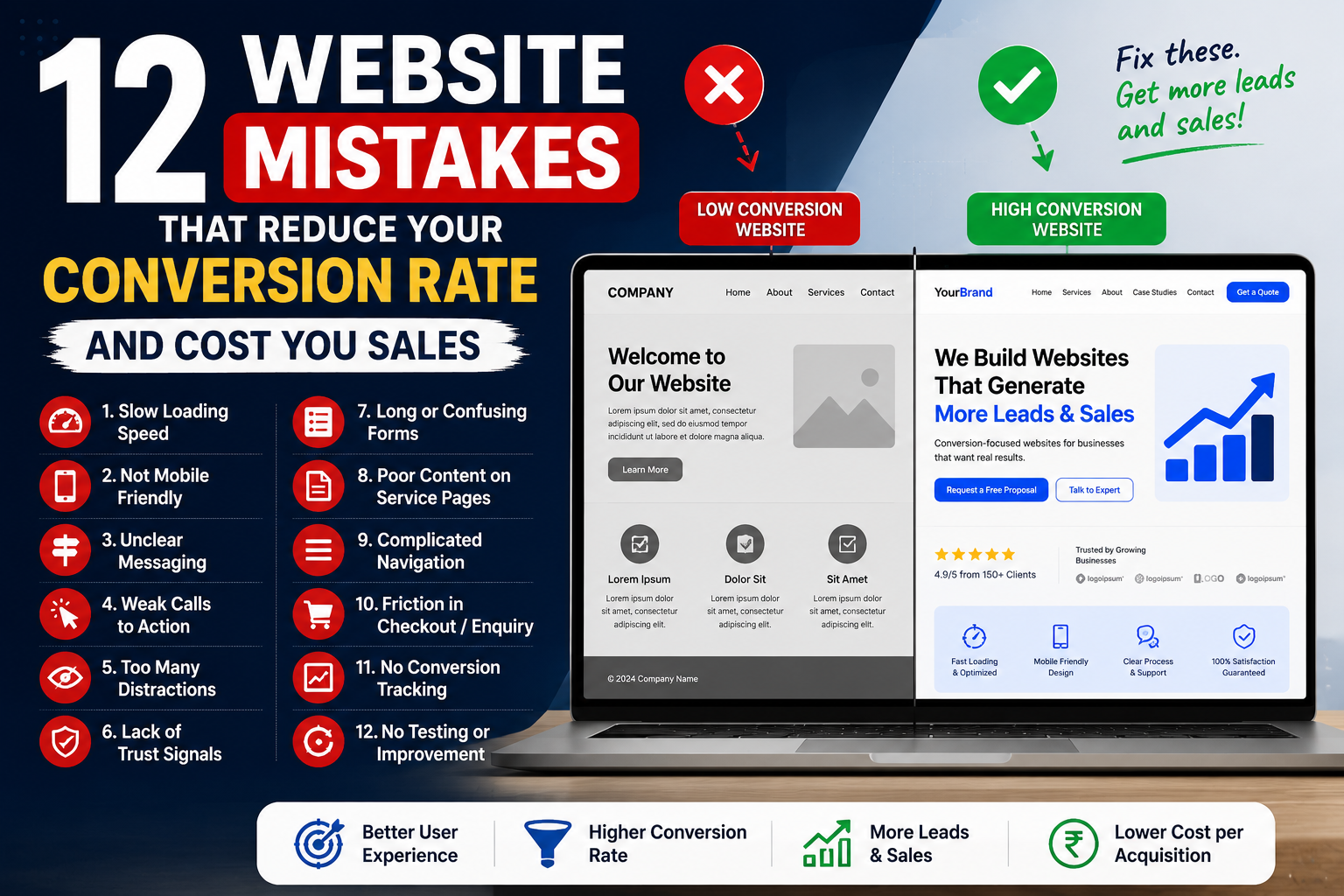
  • 12 Website Mistakes That Reduce Your Conversion Rate and Cost You Sales

    12 Website Mistakes That Reduce Your Conversion Rate and Cost You Sales

    Your website may be receiving traffic from Google, Meta Ads, social media, referrals or email campaigns—but traffic alone does not generate business growth.

    Visitors must take a meaningful action.

    That action may include:

    • Submitting an enquiry
    • Calling your business
    • Starting a WhatsApp conversation
    • Booking an appointment
    • Requesting a quotation
    • Purchasing a product
    • Registering for a service
    • Downloading a brochure

    The percentage of visitors who complete the desired action is known as the website conversion rate.

    A website may look modern and still fail to convert. Slow speed, weak messaging, poor mobile usability, unclear buttons and complicated forms can prevent interested visitors from becoming customers.

    This guide explains 12 common mistakes that reduce your website conversion rate and how to fix them.

    Table of Contents

    1. Your Website Loads Too Slowly
    2. Your Website Is Not Mobile-Friendly
    3. Your Headline Is Unclear
    4. Your Calls to Action Are Weak
    5. Your Website Has Too Many Distractions
    6. You Are Not Building Enough Trust
    7. Your Forms Are Too Long or Confusing
    8. Your Service and Product Pages Lack Detail
    9. Your Website Navigation Is Complicated
    10. Your Checkout or Enquiry Process Has Too Much Friction
    11. You Are Not Using Conversion Tracking
    12. You Are Not Testing or Improving the Website
    13. How to Measure Website Conversions
    14. How UpscaleEra Helps Improve Conversion Rates
    15. Frequently Asked Questions

    What Is a Website Conversion Rate?

    A website conversion rate is the percentage of visitors who complete a desired action.

    For example, if 1,000 people visit your website and 30 submit an enquiry, the conversion rate is 3%.

    Different businesses may track different conversions.

    Service Business Conversions

    • Contact-form submissions
    • Phone calls
    • WhatsApp enquiries
    • Appointment bookings
    • Quotation requests
    • Brochure downloads

    eCommerce Conversions

    • Product purchases
    • Add-to-cart actions
    • Checkout initiation
    • Email registrations
    • Repeat purchases
    • Subscription sign-ups

    B2B Conversions

    • Demo requests
    • Consultation bookings
    • Proposal requests
    • Lead-form submissions
    • Whitepaper downloads
    • Sales-meeting bookings

    Improving your website conversion rate does not always require more website traffic.

    Sometimes, fixing the existing customer journey can generate more leads or sales from the traffic you already receive.

    Why Website Conversion Rate Matters

    Consider two websites receiving the same amount of traffic.

    MetricWebsite AWebsite B
    Monthly visitors5,0005,000
    Conversion rate1%3%
    Leads or sales50150

    Website B generates three times more conversions without increasing traffic.

    A stronger conversion rate can help your business:

    • Generate more leads
    • Reduce advertising waste
    • Lower customer acquisition cost
    • Improve return on ad spend
    • Increase online sales
    • Improve sales-team efficiency
    • Get more value from SEO traffic
    • Scale campaigns more confidently

    This is why conversion-focused website development is as important as attracting visitors.

    1. Your Website Loads Too Slowly

    Website visitors expect pages to load quickly.

    When a page takes too long to open, users may leave before reading the headline, exploring the offer or submitting an enquiry.

    Website speed can be affected by:

    • Oversized images
    • Cheap or weak hosting
    • Heavy themes
    • Too many plugins
    • Unnecessary scripts
    • Large video backgrounds
    • Poor coding
    • No caching
    • Unoptimised databases
    • Third-party applications

    A slow website can reduce both user satisfaction and your website conversion rate.

    How to Fix It

    Improve performance by:

    • Compressing images
    • Using WebP or AVIF formats
    • Choosing reliable hosting
    • Enabling browser caching
    • Reducing unnecessary plugins
    • Removing unused scripts
    • Using lazy loading
    • Optimising fonts
    • Improving code quality
    • Testing mobile performance

    Do not judge speed only on desktop Wi-Fi.

    Test your website on a mobile device and a normal mobile-data connection.

    2. Your Website Is Not Mobile-Friendly

    A website can look excellent on a large desktop screen and still be difficult to use on mobile.

    Common mobile problems include:

    • Small text
    • Tiny buttons
    • Overlapping sections
    • Cut-off images
    • Horizontal scrolling
    • Difficult forms
    • Slow menus
    • Pop-ups covering the screen
    • Complicated checkout
    • Buttons placed too close together

    Visitors arriving from Instagram, Facebook, WhatsApp and mobile Google searches usually expect a smooth mobile experience.

    A mobile-friendly website should not simply shrink the desktop layout. The complete user journey should be planned for smaller screens.

    How to Fix It

    Check whether:

    • Text is readable
    • Buttons are easy to tap
    • Menus open correctly
    • Forms are simple
    • Phone numbers are clickable
    • WhatsApp buttons work
    • Images resize properly
    • Product pages are easy to browse
    • Checkout is smooth
    • Key information appears early

    A conversion-focused website should make it easy for mobile users to take action with minimal effort.

    3. Your Headline Is Unclear

    The first headline should help visitors immediately understand:

    • What you offer
    • Who it is for
    • What benefit they receive
    • What they should do next

    Weak headline:

    Welcome to Our Website

    This does not communicate the service or value.

    Stronger headline:

    Conversion-Focused Shopify and WordPress Websites for Growing Businesses

    Another example:

    Generate More Qualified Leads With Performance Marketing and High-Converting Landing Pages

    A clear headline can improve the website conversion rate because visitors understand the offer without searching through the full page.

    How to Fix It

    Write headlines that include:

    • The customer
    • The problem
    • The solution
    • The main benefit
    • A relevant differentiator

    Avoid vague statements such as:

    • We Create Excellence
    • Your Partner in Success
    • Welcome to Our World
    • Building Better Futures

    These phrases may sound professional but do not clearly explain what the business does.

    4. Your Calls to Action Are Weak

    A call to action tells visitors what to do next.

    Common calls to action include:

    • Book a Consultation
    • Request a Quotation
    • Call Now
    • Start a WhatsApp Chat
    • Shop Now
    • Schedule an Appointment
    • Get a Free Audit
    • View Available Packages
    • Download the Brochure

    Weak calls to action include:

    Click Here
    Submit
    Learn More

    These are not always wrong, but they may not clearly communicate the result of clicking.

    How to Fix It

    Use specific action-led buttons such as:

    Book Your Free Consultation
    Request a Website Proposal
    Talk to a Marketing Expert
    Check Product Availability

    Place important calls to action:

    • Near the top of the page
    • After key benefits
    • Near testimonials
    • At the end of service sections
    • At the bottom of the page

    Do not use five different primary actions on the same page. Identify the most important conversion goal.

    5. Your Website Has Too Many Distractions

    Adding more elements does not always create a better website.

    Too many banners, buttons, animations, colours and pop-ups can make the page confusing.

    Common distractions include:

    • Multiple pop-ups
    • Autoplay videos
    • Constant animations
    • Too many menu items
    • Several competing buttons
    • Large blocks of unrelated content
    • Excessive sliders
    • Flashing offers
    • Multiple notification bars

    When visitors do not know where to look, they may leave without taking action.

    How to Fix It

    Simplify the page.

    Each important page should have:

    • One clear goal
    • One primary call to action
    • Logical content order
    • Consistent visual style
    • Enough white space
    • Clear headings
    • Limited distractions

    A clean layout can improve your website conversion rate by making the customer journey easier to understand.

    6. You Are Not Building Enough Trust

    Customers may hesitate to submit an enquiry or complete a purchase when the website does not feel trustworthy.

    Important trust signals include:

    • Genuine customer reviews
    • Case studies
    • Client logos
    • Team information
    • Office address
    • Contact details
    • Professional email address
    • Certifications
    • Secure payment options
    • Privacy policy
    • Terms and conditions
    • Return or refund policy
    • Real product photographs
    • Clear company information

    For service businesses, visitors may want to see previous work and understand who will manage their project.

    For eCommerce businesses, customers may want clarity about shipping, payments, returns and customer support.

    How to Fix It

    Add trust signals near important conversion points.

    For example, beside an enquiry form, you can include:

    • Response time
    • Privacy assurance
    • Client count
    • Consultation process
    • Customer rating
    • Relevant certification

    Avoid fake testimonials, misleading counters or unsupported claims.

    Trust should be specific, genuine and easy to verify.

    7. Your Forms Are Too Long or Confusing

    Forms are one of the most important parts of the conversion journey.

    A form that asks too many questions can reduce submissions.

    A form that asks too few questions may generate poor-quality leads.

    The right length depends on:

    • Service value
    • Customer type
    • Sales process
    • Qualification requirements
    • Buying stage

    Basic Lead Form

    A basic form may request:

    • Name
    • Phone number
    • Email
    • Service required
    • Message

    Qualified Lead Form

    A more detailed form may request:

    • Business name
    • Website URL
    • Service requirement
    • Budget range
    • Timeline
    • Current challenge
    • Preferred contact method

    How to Fix It

    Use only the questions necessary for the next step.

    Also make sure:

    • Labels are clear
    • Error messages are understandable
    • Required fields are marked
    • The submit button is specific
    • Mobile fields are easy to complete
    • The confirmation message explains what happens next

    Instead of:

    Submit

    Use:

    Request My Consultation

    or:

    Send My Website Requirements

    8. Your Service or Product Pages Lack Detail

    Visitors need enough information to make a decision.

    A weak service page may include only:

    • A short paragraph
    • A generic image
    • A contact button

    A strong service page should explain:

    • The problem
    • The solution
    • Who the service is for
    • Benefits
    • Process
    • Deliverables
    • Timelines
    • Frequently asked questions
    • Relevant work
    • Next step

    A strong product page should include:

    • Product title
    • Clear images
    • Benefits
    • Features
    • Ingredients or specifications
    • Usage information
    • Shipping details
    • Reviews
    • Return information
    • Related products
    • Clear add-to-cart button

    How to Fix It

    Create pages based on customer questions.

    Ask:

    • What does the visitor need to know?
    • What objections might prevent action?
    • What proof can reduce uncertainty?
    • What happens after the enquiry or purchase?

    Detailed, well-structured content can improve both SEO and the website conversion rate.

    9. Your Website Navigation Is Complicated

    Visitors should be able to find important information without confusion.

    Navigation problems include:

    • Too many menu items
    • Unclear labels
    • Important pages hidden
    • Broken links
    • Different menus on different pages
    • No search function
    • Complicated product categories
    • No mobile navigation plan

    How to Fix It

    Use clear menu labels such as:

    • Services
    • About
    • Portfolio
    • Pricing
    • Blog
    • Contact
    • Shop
    • Categories

    Avoid unclear labels such as:

    • Discover
    • Experience
    • Explore More
    • Our Universe

    These terms may be creative but can make navigation harder.

    For eCommerce websites, organise:

    • Products
    • Collections
    • Filters
    • Search
    • Cart
    • Account
    • Checkout

    A simple navigation structure can help visitors reach conversion pages faster.

    10. Your Checkout or Enquiry Process Has Too Much Friction

    Friction is anything that makes the customer journey harder than necessary.

    Examples include:

    • Creating an account before checkout
    • Unexpected delivery charges
    • Too many checkout steps
    • Limited payment methods
    • Complicated enquiry forms
    • Broken coupon codes
    • Slow payment pages
    • No confirmation message
    • No guest checkout
    • Unclear return policy
    • Repeated information requests

    Every unnecessary step can reduce conversions.

    How to Fix It

    For eCommerce websites:

    • Offer guest checkout
    • Show shipping charges clearly
    • Provide trusted payment options
    • Reduce unnecessary fields
    • Display delivery information
    • Keep cart totals visible
    • Test checkout on mobile

    For service websites:

    • Keep forms simple
    • Add call and WhatsApp options
    • Confirm successful submission
    • Explain response time
    • Allow appointment scheduling
    • Avoid asking for information twice

    Improving these steps can increase the website conversion rate without increasing advertising spend.

    11. You Are Not Using Conversion Tracking

    Without tracking, you may know how many people visited the website but not what they did.

    Important conversions may include:

    • Form submissions
    • Phone-number clicks
    • WhatsApp clicks
    • Appointment bookings
    • Product purchases
    • Add-to-cart events
    • Checkout initiation
    • File downloads
    • Email sign-ups

    Useful tracking tools may include:

    • Google Analytics 4
    • Google Tag Manager
    • Google Search Console
    • Meta Pixel
    • Meta Conversion API
    • Google Ads conversion tracking
    • Shopify analytics
    • CRM systems

    How to Fix It

    Create a tracking plan before running advertisements.

    For each important action, define:

    • Event name
    • Page
    • Platform
    • Value
    • Source
    • Reporting method

    Do not rely only on button-click counts.

    Where possible, connect website data with qualified leads, sales and revenue.

    12. You Are Not Testing and Improving the Website

    A website should not remain unchanged for years.

    Customer behaviour, devices, competitors and marketing channels continue to change.

    Conversion optimisation may involve testing:

    • Headlines
    • Calls to action
    • Form length
    • Page layout
    • Testimonials
    • Product images
    • Offers
    • Pricing presentation
    • Checkout flow
    • Mobile design
    • Page speed

    How to Fix It

    Review website performance regularly.

    Check:

    • Which pages receive traffic?
    • Where do visitors leave?
    • Which forms perform best?
    • Which devices convert?
    • Which traffic sources generate customers?
    • Which pages are slow?
    • Which buttons receive clicks?
    • Which products are abandoned?

    Use real data rather than changing the website based only on personal preference.

    Continuous improvement is essential for a stronger website conversion rate.

    How to Measure Website Conversion Performance

    Track these metrics:

    MetricWhat It Shows
    Website visitorsTotal traffic
    Conversion ratePercentage completing the desired action
    Form-completion rateForm submissions compared with visitors
    Add-to-cart rateVisitors adding products to cart
    Checkout completion rateCheckouts converted into purchases
    Bounce or engagement dataWhether visitors interact with the page
    Cost per conversionMarketing cost for each action
    Customer acquisition costCost of acquiring a customer
    Revenue per visitorRevenue generated from traffic
    Mobile conversion ratePerformance on mobile devices

    Compare conversion rates by:

    • Device
    • Traffic source
    • Landing page
    • Location
    • Campaign
    • Product
    • Service
    • New and returning users

    A single overall percentage may hide important differences.

    Website Conversion Rate Improvement Checklist

    Use this checklist before launching or redesigning a website:

    • Website loads quickly
    • Mobile layout works correctly
    • Headline explains the offer
    • Main CTA is visible
    • Contact details are easy to find
    • Forms are tested
    • WhatsApp button works
    • Phone link works
    • Service pages are detailed
    • Product pages answer key questions
    • Reviews are visible
    • Trust signals are genuine
    • Checkout works on mobile
    • Analytics is connected
    • Conversion events are configured
    • Confirmation messages work
    • Privacy policy is available
    • Links are not broken
    • Images are compressed
    • Website is regularly reviewed

    How UpscaleEra Helps Improve Website Conversion Rates

    UpscaleEra develops conversion-focused websites, Shopify stores, WordPress websites and landing pages designed to support measurable business goals.

    The process can include:

    • Website audit
    • User journey planning
    • Conversion-focused design
    • WordPress development
    • Shopify development
    • WooCommerce development
    • Landing-page development
    • Mobile optimisation
    • Speed optimisation
    • Form development
    • WhatsApp integration
    • Analytics setup
    • Meta Pixel integration
    • Google Ads tracking
    • Conversion-rate optimisation

    Explore UpscaleEra’s website development services:

    https://upscaleera.com/website-development/

    Businesses planning to drive traffic through advertising can also explore:

    https://upscaleera.com/performance-marketing/

    For social media and demand-generation support:

    https://upscaleera.com/social-media-marketing/

    Final Thoughts

    A low website conversion rate is not always caused by poor traffic.

    The problem may exist in:

    • Website speed
    • Mobile usability
    • Headline clarity
    • Calls to action
    • Page design
    • Trust
    • Forms
    • Product information
    • Checkout
    • Tracking
    • Follow-up
    • Lack of testing

    Before spending more money on advertising, review whether the website is prepared to convert additional visitors.

    A strong website should make it easy for users to:

    • Understand your offer
    • Trust your business
    • Find relevant information
    • Take the next step
    • Complete the conversion

    Improving the customer journey can generate more business from the same amount of traffic.

    Ready to Improve Your Website Conversion Rate?

    Is your website receiving traffic but not generating enough enquiries or sales?

    Use the anchor text:

    Request a website conversion audit

    Link it to:

    https://upscaleera.com/contact/

    UpscaleEra can review your website speed, mobile experience, calls to action, forms, landing pages, tracking and conversion journey.

    Frequently Asked Questions

    What is a good website conversion rate?

    There is no universal conversion rate that applies to every business. It depends on the industry, traffic source, customer intent, offer, website type and conversion goal. Compare your website against its own historical performance and business profitability.

    How can I improve my website conversion rate?

    Improve page speed, mobile usability, headlines, calls to action, trust signals, forms, service information, checkout and conversion tracking. Use website data to identify the biggest problem areas.

    Why is my website getting traffic but no leads?

    Visitors may not understand the offer, trust the business or know what to do next. Slow loading, weak calls to action, complicated forms and irrelevant traffic can also reduce leads.

    Does website speed affect conversions?

    Yes. Slow-loading pages can cause visitors to leave before viewing the offer or completing an enquiry or purchase.

    Should I use a long or short enquiry form?

    Use the shortest form that still collects the information needed for the next sales step. High-value or complex services may require more qualification than lower-cost services.

    Why do customers abandon checkout?

    Common causes include unexpected charges, complicated checkout, limited payment options, forced account creation, slow pages and unclear delivery or return information.

    How often should I optimise my website?

    Review website performance regularly and after major marketing campaigns, redesigns, platform updates or changes in customer behaviour.

  • Shopify vs WordPress: Which Is Better for Your Business in 2026?

    Shopify vs WordPress: Which Is Better for Your Business in 2026?

    Choosing between Shopify vs WordPress is one of the most important decisions a business can make before developing a new website or online store.

    Both platforms can support professional business websites and eCommerce stores, but they work in very different ways.

    Shopify is a hosted commerce platform designed to help businesses create and manage online stores through one central system. WordPress is an open-source content management system that can be transformed into an eCommerce store using WooCommerce.

    The right choice depends on your business model, budget, technical requirements, content strategy and long-term growth plans.

    A product-focused business that wants a managed platform may prefer Shopify. A company that needs extensive design freedom, content capabilities or custom functionality may prefer WordPress.

    This complete Shopify vs WordPress comparison explains the most important differences to help you choose the right platform for your business.

    Table of Contents

    1. What Is Shopify?
    2. What Is WordPress?
    3. Shopify vs WordPress: Quick Comparison
    4. Ease of Use
    5. Website Setup
    6. Design and Customisation
    7. eCommerce Features
    8. SEO Capabilities
    9. Costs and Pricing
    10. Security and Maintenance
    11. Apps, Plugins and Integrations
    12. Content Marketing
    13. Performance and Scalability
    14. Ownership and Control
    15. Which Platform Should You Choose?
    16. Common Platform-Selection Mistakes
    17. How UpscaleEra Can Help
    18. Frequently Asked Questions

    What Is Shopify?

    Shopify is a hosted commerce platform that allows businesses to create an online store, add products, manage orders and accept payments.

    The platform provides tools for:

    • Store design
    • Product management
    • Inventory management
    • Order processing
    • Discounts
    • Payments
    • Shipping
    • Customer accounts
    • Analytics
    • Marketing integrations
    • Online and offline selling

    Shopify manages much of the technical infrastructure, including hosting, core updates and platform-level security.

    This makes it useful for business owners who want to focus on selling products instead of managing servers, software updates and technical maintenance.

    Shopify describes itself as a complete commerce platform for businesses selling online and across multiple channels.

    External resource:

    https://www.shopify.com/in/about

    What Is WordPress?

    WordPress is an open-source content management system used to create blogs, business websites, service websites, membership platforms and online stores.

    WordPress can be customised using:

    • Themes
    • Plugins
    • Page builders
    • Custom code
    • APIs
    • Third-party integrations
    • Custom post types

    For eCommerce functionality, WordPress is commonly combined with WooCommerce.

    WooCommerce is an open-source commerce platform built for WordPress. It allows businesses to customise products, payments, checkout processes, hosting and store functionality.

    External resource:

    Unlike Shopify, WordPress generally requires the website owner or developer to manage hosting, software updates, backups, security and technical maintenance.

    Shopify vs WordPress: Quick Comparison

    FeatureShopifyWordPress with WooCommerce
    Platform typeHosted commerce platformOpen-source CMS
    HostingIncludedPurchased separately
    SetupFaster for standard storesRequires more setup
    MaintenanceMostly platform-managedManaged by owner or developer
    CustomisationStrong but platform-controlledHighly flexible
    eCommerceBuilt into the platformAdded using WooCommerce
    Content managementGoodExcellent
    SecurityCore platform managed by ShopifyDepends on hosting and maintenance
    Technical knowledgeLower requirementModerate to advanced
    Best suited forProduct-focused storesCustom and content-heavy websites

    The Shopify vs WordPress decision should be based on your business model, website requirements and long-term plans.

    1. Shopify vs WordPress for Ease of Use

    Ease of use is one of the most important differences between Shopify and WordPress.

    Shopify

    Shopify provides a guided setup process and a central dashboard for managing:

    • Products
    • Orders
    • Discounts
    • Customers
    • Shipping
    • Payments
    • Analytics

    Many essential eCommerce features are already built into the platform.

    A Shopify user usually does not need to manage:

    • Web hosting
    • Core platform installation
    • Server settings
    • Manual software updates
    • Platform-level security patches

    This makes Shopify suitable for business owners who want a relatively simple and organised backend.

    WordPress

    WordPress provides more freedom, but the initial setup requires more decisions.

    A WordPress eCommerce website may require:

    • Website hosting
    • Domain configuration
    • WordPress installation
    • Theme installation
    • WooCommerce setup
    • Payment gateway integration
    • Security configuration
    • Backup systems
    • Speed optimisation
    • Plugin updates

    WordPress can become easy to manage after professional setup, but creating the complete system usually requires more technical knowledge.

    Verdict

    Choose Shopify when ease of use and managed infrastructure are your main priorities.

    Choose WordPress when you need more control and have access to professional development support.

    2. Shopify vs WordPress for Website Setup

    Shopify Setup

    A standard Shopify store can be launched quickly when the product catalogue, content and branding are ready.

    The setup generally includes:

    • Selecting a theme
    • Adding products
    • Creating collections
    • Configuring payments
    • Setting up shipping
    • Adding legal policies
    • Connecting the domain
    • Testing the checkout process

    Because hosting and the core platform are already provided, there are fewer technical steps.

    WordPress Setup

    A WordPress website may take longer because it involves multiple components.

    The setup can include:

    • Selecting suitable hosting
    • Installing WordPress
    • Installing WooCommerce
    • Choosing a theme
    • Configuring plugins
    • Adding security
    • Creating backups
    • Optimising speed
    • Developing custom pages
    • Connecting payment gateways

    The choice between Shopify vs WordPress also depends on how much control you need over hosting, functionality and website structure.

    Verdict

    Shopify is generally faster for launching a standard eCommerce store.

    WordPress is better when the project requires a specialised website structure or custom functionality.

    3. Design and Customisation

    Shopify Design

    Shopify offers free and paid themes designed specifically for eCommerce.

    Themes can be customised through:

    • Theme settings
    • Sections
    • Blocks
    • Shopify Liquid
    • Custom CSS
    • Page-builder applications

    Shopify provides enough flexibility for many product brands, but advanced customisations must work within the platform’s structure.

    WordPress Design

    WordPress offers significantly more design freedom.

    Businesses can build websites using:

    • Gutenberg
    • Elementor
    • Bricks
    • Custom themes
    • WooCommerce templates
    • Custom CSS
    • JavaScript
    • PHP development

    WordPress can support:

    • Service websites
    • Online stores
    • Membership websites
    • Directories
    • Learning platforms
    • Booking systems
    • Content portals
    • Custom customer dashboards

    Verdict

    Choose Shopify for a professionally designed online store with controlled customisation.

    Choose WordPress when maximum control over layouts, content and functionality is required.

    4. Shopify vs WordPress for eCommerce

    Shopify is built specifically for online commerce.

    Its core environment supports:

    • Product catalogues
    • Inventory
    • Customer accounts
    • Discount codes
    • Order management
    • Shipping
    • Payments
    • Analytics
    • Sales channels
    • App integrations

    WordPress requires WooCommerce to provide eCommerce functionality.

    WooCommerce can support:

    • Physical products
    • Digital products
    • Variable products
    • Subscriptions
    • Bookings
    • Memberships
    • Services
    • Custom pricing
    • Specialised checkout systems

    WooCommerce’s strongest advantage is flexibility. Businesses can modify the store extensively through extensions and custom development.

    For product-focused brands, the Shopify vs WordPress comparison may favour Shopify because it offers a managed commerce environment.

    For businesses requiring unique purchasing workflows or extensive customisation, WordPress may be more suitable.

    Verdict

    Choose Shopify when you need standard eCommerce features in an organised system.

    Choose WordPress with WooCommerce when your online store needs customised workflows or functionality.

    5. Shopify vs WordPress for SEO

    Both Shopify and WordPress can support strong SEO when configured properly.

    Shopify SEO

    Shopify provides:

    • Editable SEO titles
    • Meta descriptions
    • Image alt text
    • Automatic XML sitemaps
    • Mobile-friendly themes
    • Blogging functionality
    • Redirect management
    • Structured website architecture

    However, some URL structures and technical elements are controlled by Shopify.

    WordPress SEO

    WordPress offers greater control over:

    • URLs
    • Metadata
    • Schema
    • Internal linking
    • Redirects
    • Sitemaps
    • Technical SEO
    • Content categories
    • Website architecture

    SEO plugins such as Rank Math can help manage metadata, indexing, schema, redirects and content analysis.

    For content-heavy businesses, the Shopify vs WordPress comparison often favours WordPress because of its publishing and technical SEO flexibility.

    Verdict

    Both platforms can rank successfully.

    Shopify offers a managed SEO environment, while WordPress provides greater technical and content control.

    6. Shopify vs WordPress Costs

    The total cost should include more than the initial website-development fee.

    Shopify Costs

    Shopify expenses may include:

    • Monthly subscription
    • Premium theme
    • Paid applications
    • Custom development
    • Payment-related charges
    • Marketing integrations
    • Ongoing optimisation

    Shopify can provide relatively predictable platform costs, but using several paid applications may increase monthly expenses.

    WordPress Costs

    WordPress expenses may include:

    • Website hosting
    • Domain renewal
    • Premium theme
    • Premium plugins
    • WooCommerce extensions
    • Security
    • Backups
    • Maintenance
    • Developer support
    • Custom development

    WordPress and WooCommerce are open source, but creating and operating a professional website is not automatically free.

    When comparing Shopify vs WordPress, businesses should consider both the initial development cost and ongoing maintenance expenses.

    Verdict

    Shopify generally offers more predictable subscription-based expenses.

    WordPress provides greater control over where money is spent but may require regular technical support.

    7. Security and Maintenance

    Shopify Security

    Shopify manages much of the platform’s technical infrastructure.

    Store owners generally do not need to manage:

    • Server updates
    • Core platform patches
    • Hosting configuration
    • Platform-level maintenance

    Businesses must still protect administrator accounts, passwords, user access and third-party applications.

    WordPress Security

    WordPress security depends on:

    • Hosting quality
    • Theme quality
    • Plugin quality
    • Software updates
    • SSL configuration
    • Backups
    • Access controls
    • Security monitoring

    The website owner or developer is responsible for maintaining the system.

    Poor hosting, outdated plugins or weak passwords can create security risks.

    Verdict

    Shopify is easier for businesses that prefer managed technical security.

    WordPress is suitable for companies with a reliable website-maintenance process.

    8. Apps, Plugins and Integrations

    Shopify Apps

    Shopify applications can add:

    • Product reviews
    • Subscription systems
    • Upsells
    • Loyalty programmes
    • Email marketing
    • Product filters
    • Shipping tools
    • Page-building features
    • Customer support
    • Analytics

    Apps are convenient, but several paid subscriptions can increase monthly costs.

    WordPress Plugins

    WordPress plugins can provide:

    • SEO tools
    • Forms
    • Security
    • Backups
    • Membership systems
    • Booking features
    • CRM integrations
    • Learning-management systems
    • Marketing automation
    • WooCommerce extensions

    WordPress offers extensive integration options, but installing too many plugins can affect speed, compatibility and security.

    Verdict

    Both platforms offer strong integration ecosystems.

    Shopify provides a commerce-focused app environment, while WordPress offers broader technical flexibility.

    9. Content Marketing Capabilities

    Content is an important factor in the Shopify vs WordPress decision.

    Shopify Content

    Shopify includes blogging and page-building capabilities.

    It is suitable for:

    • Product guides
    • Brand stories
    • Announcements
    • Basic SEO articles
    • Educational content

    WordPress Content

    WordPress was originally created as a publishing system and remains highly effective for content-heavy websites.

    It can support:

    • Large blogs
    • News portals
    • Knowledge bases
    • Location pages
    • Service pages
    • Case studies
    • Resource centres
    • Complex content categories

    Verdict

    Shopify is suitable for product-led content strategies.

    WordPress is generally stronger for businesses that depend heavily on SEO blogs, service pages and educational resources.

    10. Performance and Scalability

    Shopify Performance

    Shopify manages hosting and infrastructure.

    This gives businesses more predictable platform performance without requiring server configuration.

    The platform can support small businesses as well as large commerce operations.

    WordPress Performance

    WordPress performance depends on:

    • Hosting quality
    • Theme development
    • Plugin usage
    • Image optimisation
    • Caching
    • Database management
    • Code quality

    A professionally developed WordPress website can perform extremely well.

    However, weak hosting, oversized images or excessive plugins can create performance issues.

    Verdict

    Shopify provides more predictable managed performance.

    WordPress can deliver excellent performance when properly developed and maintained.

    11. Ownership and Platform Control

    Shopify businesses operate inside Shopify’s hosted environment.

    The store owner controls business information, content, products and customer data, but the underlying platform remains managed by Shopify.

    WordPress provides greater control over:

    • Hosting
    • Website files
    • Database
    • Code
    • Plugins
    • Themes
    • Custom functionality

    Before finalising Shopify vs WordPress, consider how important platform control and independence are to your business.

    Verdict

    Choose Shopify when convenience is more important than complete technical control.

    Choose WordPress when ownership, flexibility and platform independence are major priorities.

    Shopify Is Better When

    Shopify may be the right option when:

    • Your main objective is selling products
    • You want faster store setup
    • You prefer managed hosting
    • You do not want to manage technical updates
    • You need an organised commerce dashboard
    • Your team prefers a straightforward backend
    • You want reliable standard eCommerce functionality
    • You plan to sell across multiple channels

    WordPress Is Better When

    WordPress may be the right option when:

    • You require extensive design customisation
    • Content marketing is a major priority
    • You need custom functionality
    • You want control over hosting
    • You are building a service-focused website
    • You require advanced forms or integrations
    • You need customised WooCommerce workflows
    • You have access to ongoing development support

    Shopify vs WordPress for Small Businesses

    For a small product-based company, Shopify may provide a simpler way to launch and manage an online store.

    For a service-based company, consultant, clinic or marketing agency, WordPress may provide more flexibility for service pages, blogs, forms and local SEO.

    Consider:

    • What you sell
    • How customers purchase
    • Who will manage the website
    • How much customisation is required
    • How important content marketing is
    • Whether technical support is available
    • Your long-term growth plans

    The best platform is not necessarily the one with the most features. It is the one that supports your business without creating unnecessary complexity.

    Common Shopify vs WordPress Selection Mistakes

    Choosing Only by Initial Price

    A low-cost website may become expensive when it requires rebuilding later.

    Ignoring Ongoing Costs

    Consider subscriptions, hosting, plugins, applications, maintenance and development support.

    Installing Too Many Apps or Plugins

    Excessive extensions can increase costs and reduce website performance.

    Ignoring Mobile Experience

    Customers should be able to browse, enquire and purchase easily on mobile devices.

    Choosing Design Over Functionality

    A visually impressive website must still load quickly and guide customers toward conversion.

    Ignoring SEO Structure

    The platform should support your long-term search and content strategy.

    Launching Without Conversion Tracking

    Google Analytics, Meta Pixel, advertising tracking and eCommerce events should be planned before launch.

    How UpscaleEra Helps Businesses Choose the Right Platform

    UpscaleEra develops Shopify stores, WordPress websites, WooCommerce stores and conversion-focused landing pages.

    Our approach focuses on speed, user experience, mobile performance and business conversions—not visual design alone.

    UpscaleEra can help with:

    • Platform consultation
    • Shopify development
    • WordPress development
    • WooCommerce development
    • Website redesign
    • Landing-page development
    • Product-page optimisation
    • Mobile optimisation
    • Speed improvement
    • Conversion tracking
    • SEO-friendly structure
    • Marketing integrations

    Explore our website development services to understand how we build websites designed for business growth.

    Businesses planning to advertise their store can also explore our performance marketing services.

    For social growth and content support, visit our social media marketing services.

    Final Thoughts

    The Shopify vs WordPress decision depends on what your business needs from its website.

    Shopify is a strong choice for product-focused businesses that want a managed commerce platform and a simpler technical experience.

    WordPress with WooCommerce is suitable for businesses that need extensive customisation, content flexibility and greater control over the website environment.

    Choose Shopify when convenience, faster setup and commerce management are the main priorities.

    Choose WordPress when flexibility, ownership, SEO content and custom functionality matter more.

    Before choosing, review:

    • Your business model
    • Product catalogue
    • Content strategy
    • Website budget
    • Technical resources
    • Customisation requirements
    • Maintenance capacity
    • Long-term growth plans

    The right platform should support your business for years, not simply help you launch quickly.

    Ready to Build Your Business Website?

    Still unsure which platform is right for your business?

    Request a website consultation with the UpscaleEra team to compare your requirements, budget and long-term growth plans.

    Frequently Asked Questions

    Is Shopify better than WordPress?

    Shopify may be better for businesses that want a managed eCommerce platform with a faster setup process and less technical maintenance. WordPress may be better for businesses that require extensive customisation, content flexibility and control over the website environment.

    Is WordPress cheaper than Shopify?

    WordPress is open source, but businesses still need hosting, plugins, security, maintenance and development support. Shopify uses subscription-based pricing and may require paid applications. The total cost depends on the website’s requirements.

    Can WordPress be used for eCommerce?

    Yes. WordPress can be converted into an eCommerce website using WooCommerce, an open-source commerce platform developed for WordPress.

    Which platform is better for SEO?

    Both platforms can support SEO. WordPress generally offers greater technical and content flexibility, while Shopify provides a managed SEO environment suitable for many online stores.

    Which platform is better for beginners?

    Shopify is often easier for beginners because hosting, platform updates and standard eCommerce features are managed inside one system.

    Can I migrate from WordPress to Shopify later?

    Yes. Migration is possible, but products, customers, orders, content, URLs and redirects must be transferred carefully to minimise data loss and SEO issues.