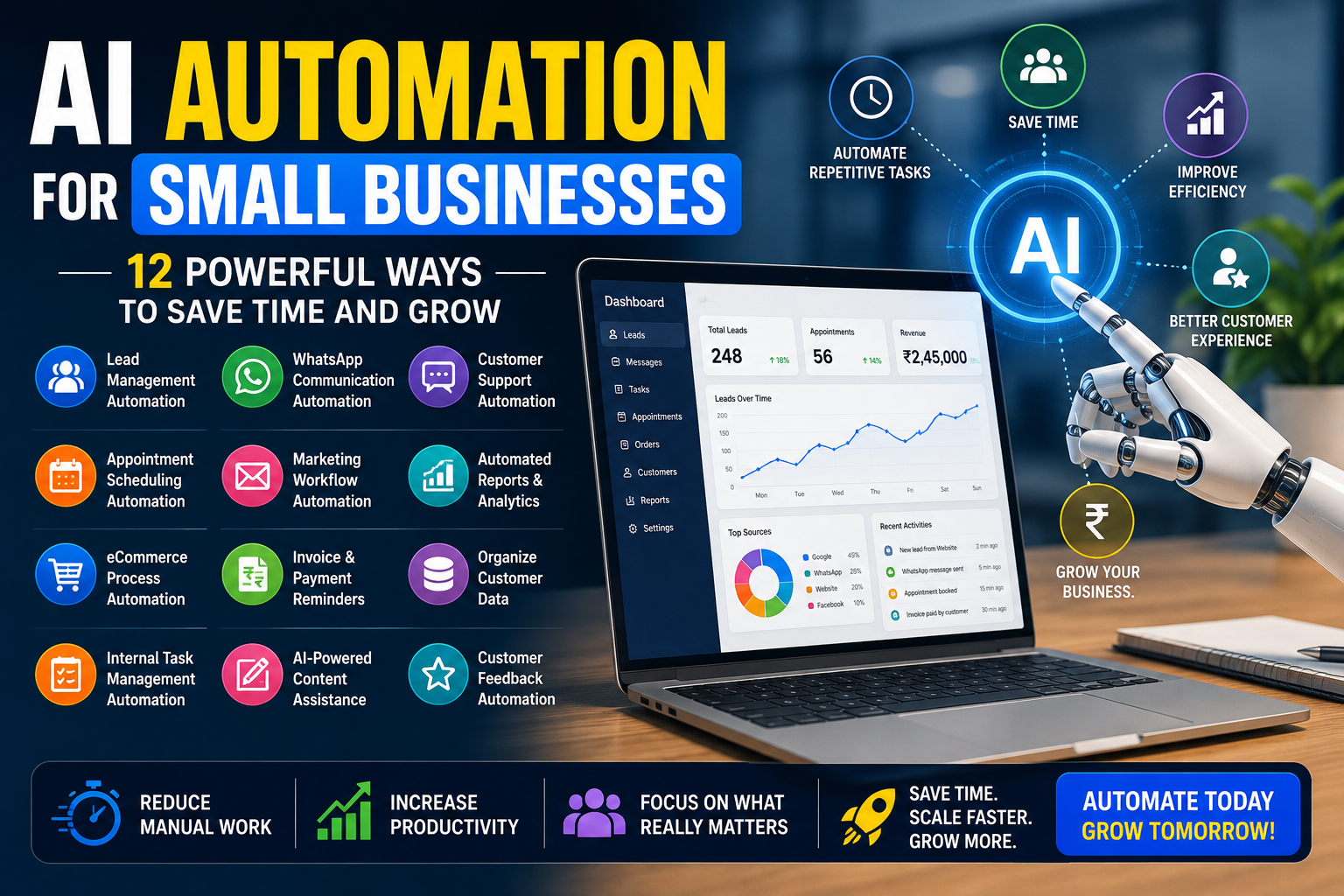
Running a small business often means managing sales, marketing, customer support, payments, reports and daily operations with a limited team.
Thank you for reading this post, don’t forget to subscribe!Employees may spend several hours copying information between tools, responding to repetitive questions, preparing reports, following up with leads and updating spreadsheets.
This is where AI automation for small businesses can make a meaningful difference.
AI automation combines artificial intelligence with workflow automation to complete repetitive tasks, move information between tools, trigger actions and help teams make faster decisions.
It does not necessarily mean replacing employees. When implemented correctly, automation removes repetitive work so people can focus on customers, strategy, creativity and business growth.
UpscaleEra currently offers AI automation alongside performance marketing, website development, content and demand-generation services, allowing automation to be connected with broader digital-growth systems.
This guide explains 12 practical ways small businesses can use AI automation to save time, improve efficiency and create a better customer experience.
Table of Contents
- What Is AI Automation?
- Why Small Businesses Need Automation
- Automate Lead Collection
- Improve Sales Follow-Ups
- Automate WhatsApp Communication
- Provide Faster Customer Support
- Automate Appointment Booking
- Simplify Marketing Workflows
- Generate Reports Automatically
- Improve eCommerce Operations
- Automate Invoice and Payment Reminders
- Organise Customer Data
- Improve Internal Task Management
- Use AI for Content Assistance
- Create Automated Customer Feedback Systems
- How to Start With AI Automation
- Common Automation Mistakes
- How UpscaleEra Can Help
- Frequently Asked Questions
What Is AI Automation?
AI automation is the use of artificial intelligence and connected software workflows to complete tasks with limited manual involvement.
AI automation for small businesses can reduce repetitive work and help teams focus on higher-value activities.
A basic automation follows a fixed rule.
For example:
When a website form is submitted → Add the lead to Google Sheets → Send a notification to the sales team.An AI-supported automation can perform more advanced work.
For example:
When a lead submits a form → Analyse the requirement → Categorise the lead → Assign it to the correct salesperson → Create a personalised WhatsApp response.Automation workflows may connect tools such as:
- Website forms
- Google Sheets
- CRM systems
- Gmail
- Meta lead forms
- Shopify
- WordPress
- Google Calendar
- Accounting tools
- Customer-support platforms
- Reporting dashboards
Google Apps Script, for example, can automate tasks across Google Workspace products such as Sheets, Gmail and Calendar, while Microsoft Power Automate supports workflow creation across business applications.
Why AI Automation for Small Businesses Matters
Small businesses usually operate with limited time, staff and budgets.
When employees spend too much time on repetitive administration, important activities may be delayed.
These can include:
- Responding to new leads
- Following up with customers
- Updating sales records
- Preparing performance reports
- Confirming appointments
- Sending payment reminders
- Managing customer queries
- Updating order information
A well-planned AI automation for small businesses strategy can help:
- Reduce repetitive work
- Improve response times
- Reduce manual errors
- Organise customer information
- Support faster follow-up
- Improve reporting
- Create consistent processes
- Allow teams to handle more work
- Improve customer experience
Automation is most valuable when it solves a clear operational problem.
Businesses should not automate a process simply because a new AI tool is available.
One of the biggest advantages of AI automation for small businesses is the ability to save time without immediately increasing team size.
1. Automate Lead Collection
Leads may arrive through:
- Website forms
- Meta lead forms
- Google Ads
- Phone calls
- Landing pages
- Social media messages
- Offline events
Without automation, employees may manually copy each enquiry into a spreadsheet or CRM.
This can create:
- Duplicate records
- Missing information
- Slow response times
- Incorrect phone numbers
- Unassigned leads
- Lost opportunities
Automated Lead Workflow
Lead Submitted
↓
Information Validated
↓
Lead Added to CRM or Google Sheet
↓
Salesperson Assigned
↓
Notification Sent
↓
Customer Receives Confirmation
This type of AI automation for small businesses can help ensure every enquiry enters one organised system.
2. Improve Sales Follow-Ups
Many leads do not convert after one call.
The salesperson may need to send:
- A brochure
- Pricing details
- Portfolio
- Appointment reminder
- Case study
- Proposal
- Follow-up message
Manual follow-up becomes difficult when the business receives many enquiries.
Automated Follow-Up Sequence
Day 0: Confirmation message
Day 1: First follow-up
Day 3: Helpful service information
Day 5: Case study or customer result
Day 7: Consultation reminder
Day 10: Final follow-up
The sequence should stop when the customer replies, books a meeting or becomes a client.
Automation should support personal communication rather than create repetitive spam.
3. Automate WhatsApp Communication
WhatsApp is an important communication channel for many Indian businesses.
It can be used to send:
- Lead confirmations
- Appointment reminders
- Order updates
- Payment reminders
- Product information
- Support updates
- Feedback requests
- Follow-up messages
Example
Hello Rahul, thank you for contacting UpscaleEra regarding website development. Your enquiry has been received, and our team will contact you shortly.A more advanced workflow may personalise the message according to the customer’s selected service.
For example:
- Website enquiry → Website-development message
- Meta Ads enquiry → Performance-marketing message
- Shopify enquiry → eCommerce-development message
WhatsApp automation should follow applicable platform rules, customer consent requirements and message-template policies.
4. Provide Faster Customer Support
Customers often ask similar questions repeatedly.
Examples include:
- What are your working hours?
- Do you provide delivery?
- What is the project timeline?
- Where is your office?
- How do I book an appointment?
- Which payment methods are accepted?
- What is your return policy?
- How can I track my order?
An AI-supported chatbot can respond to basic questions and direct complex issues to a human team member.
Customer-Support Workflow
Customer Sends Question
↓
AI Identifies the Topic
↓
Relevant Answer Is Provided
↓
Unresolved Issue Is Assigned to Human Support
The chatbot should clearly explain when the customer is communicating with an automated system.
Customers should also have an easy way to reach a person.
5. Automate Appointment Booking
Service businesses may spend significant time coordinating appointment availability.
This includes:
- Clinics
- Consultants
- Agencies
- Salons
- Trainers
- Coaches
- Real estate companies
- Professional service firms
An automated booking system can:
- Show available time slots
- Collect customer information
- Create a calendar event
- Send confirmation
- Send reminders
- Allow rescheduling
- Notify the relevant employee
Example Workflow
Customer Selects a Slot
↓
Google Calendar Is Updated
↓
Confirmation Is Sent
↓
Reminder Is Sent Before the Meeting
↓
Salesperson Receives Customer Details
This can reduce scheduling errors and unnecessary back-and-forth messages.
6. Simplify Marketing Workflows
Marketing requires coordination between content planning, design, publishing, lead collection and reporting.
Automation can help manage:
- Content calendars
- Post approvals
- Email campaigns
- Lead-nurture sequences
- Campaign notifications
- Customer segmentation
- Retargeting lists
- Performance summaries
For example:
Blog Published
↓
Email Draft Created
↓
Social Post Draft Created
↓
Internal Team Notified
↓
Article Added to Content Tracker
UpscaleEra’s demand-generation services currently include content, email nurturing and marketing automation as connected parts of a full-funnel strategy.
7. Generate Reports Automatically
Preparing reports manually can take several hours every week or month.
Employees may need to collect information from:
- Meta Ads
- Google Ads
- Shopify
- Google Analytics
- CRM
- Google Sheets
- Sales records
An automated dashboard can combine important metrics in one place.
Metrics May Include
- Advertising spend
- Leads generated
- Cost per lead
- Qualified leads
- Purchases
- Revenue
- Return on ad spend
- Website traffic
- Conversion rate
- Lead status
Automated Reporting Workflow
Data Collected From Platforms
↓
Dashboard Updated
↓
Weekly Summary Generated
↓
Report Sent to Team or Client
AI can also summarise the data and highlight unusual changes.
However, important business decisions should still be reviewed by a qualified person.
8. Improve eCommerce Operations
eCommerce businesses manage:
- Orders
- Inventory
- Shipping
- Customer communication
- Returns
- Product data
- Abandoned carts
- Reviews
- Payments
Automation can connect these processes.
Example eCommerce Workflows
New Order → Update Inventory → Notify Fulfilment Team → Send Customer ConfirmationOrder Shipped → Send Tracking Details → Update Order StatusCart Abandoned → Send Reminder → Offer Support → Stop Messages After PurchaseOrder Delivered → Wait Three Days → Request Customer FeedbackUpscaleEra’s website-development offering includes Shopify and custom D2C storefronts, conversion integrations and performance-focused digital experiences, which can be connected with operational automation.
Businesses can use AI automation for small businesses across marketing, customer support, lead management, reporting, and daily operations.
9. Automate Invoice and Payment Reminders
Late payments can affect cash flow.
Manual payment follow-up also consumes staff time.
An automated system can:
- Generate an invoice
- Send it to the customer
- Record the due date
- Send a reminder before the due date
- Send another reminder after the due date
- Notify accounts when payment is received
- Update the payment status
Example
Invoice Created
↓
Invoice Sent
↓
Reminder Sent Two Days Before Due Date
↓
Payment Status Checked
↓
Overdue Reminder Sent if Required
Payment messages should remain professional and should not be sent after the payment has already been recorded.
10. Organise Customer Data
Customer information may be spread across:
- Emails
- Spreadsheets
- Website forms
- Meta lead forms
- Sales employees’ phones
- CRM systems
This makes it difficult to understand the complete customer journey.
Automation can combine information into a central record.
A customer record may include:
- Name
- Phone number
- Enquiry source
- Service required
- Budget
- Assigned salesperson
- Follow-up status
- Last communication
- Purchase history
- Notes
Organised data supports better follow-up, reporting and customer service.
Businesses should collect only necessary data and protect it using appropriate access controls.
When implemented correctly, AI automation for small businesses can improve productivity while creating a smoother customer experience.
11. Improve Internal Task Management
Automation can convert customer or team actions into assigned tasks.
For example:
Client Approves Website Design
↓
Development Task Created
↓
Developer Assigned
↓
Deadline Added
↓
Project Manager Notified
Another workflow could be:
New Customer Complaint
↓
Support Ticket Created
↓
Priority Assigned
↓
Responsible Employee Notified
↓
Escalation Triggered if Unresolved
This helps create accountability and reduces dependence on memory or informal messages.
A successful AI automation for small businesses strategy should start with repetitive processes that consume the most time.
12. Use AI for Content Assistance
AI can support parts of the content-development process.
It may help with:
- Topic ideas
- Content outlines
- Headline variations
- Email drafts
- Social-media captions
- Product descriptions
- Video-script drafts
- Content repurposing
- Basic proofreading
However, AI-generated content should be reviewed before publishing.
A human should verify:
- Accuracy
- Brand tone
- Claims
- Grammar
- Customer relevance
- Legal or compliance issues
- Originality
- Cultural context
AI should assist the creative process rather than replace strategy and quality control.
13. Create Automated Customer Feedback Systems
Customer feedback helps businesses identify service problems and improvement opportunities.
An automated feedback process can:
- Send a message after delivery
- Ask for a rating
- Collect detailed feedback
- Send positive customers to a review page
- Alert the support team about negative experiences
- Store responses in a dashboard
Example
Service Completed
↓
Feedback Request Sent
↓
Customer Selects Rating
↓
Positive Feedback → Review Invitation
Negative Feedback → Support Ticket
Do not prevent customers from sharing negative feedback or pressure them to leave only positive reviews.
Benefits of AI Automation for Small Businesses
Faster Response Times
New enquiries and customer requests can be acknowledged immediately.
Lower Administrative Work
Employees spend less time copying information and sending repetitive messages.
Fewer Manual Errors
Automation reduces mistakes caused by repetitive data entry.
Better Lead Management
Every lead can be recorded, assigned and followed up consistently.
Improved Customer Experience
Customers receive timely confirmations, reminders and updates.
More Reliable Reporting
Dashboards can be updated automatically using connected data.
Easier Business Growth
A small team can manage a larger volume of work without creating the same increase in administration.
In 2026, AI automation for small businesses is becoming increasingly useful for companies looking to scale operations more efficiently.
How to Start With AI Automation
Do not begin by automating the entire business.
Start with one clear problem.
Step 1: Identify Repetitive Work
Ask:
- Which task happens every day?
- Which task takes the most time?
- Where are mistakes common?
- Which process delays customer responses?
- Which work involves copying data?
Step 2: Map the Existing Process
Write every step from beginning to end.
For example:
Lead Arrives → Employee Checks Email → Copies Details → Updates Sheet → Calls Customer → Adds NotesStep 3: Remove Unnecessary Steps
Do not automate a badly designed process.
First simplify it.
Step 4: Choose the Right Tools
Select tools that can connect with your current:
- Website
- CRM
- Google Sheets
- Shopify
- Accounting software
- Calendar
Step 5: Test With Real Examples
Run the automation using sample and real-world cases.
Step 6: Add Human Review
Important tasks should have approval or exception handling.
Step 7: Measure the Result
Track:
- Time saved
- Response time
- Error reduction
- Leads contacted
- Appointments booked
- Customer satisfaction
- Revenue impact
Common AI Automation Mistakes
Automating Without a Clear Goal
Every workflow should solve a measurable business problem.
Automating a Broken Process
Simplify the process before adding technology.
Removing Human Support Completely
Customers should be able to reach a real person when needed.
Sending Too Many Messages
Poorly planned automation can create spam and damage trust.
Ignoring Data Security
Limit access to customer and business information.
Using AI Output Without Review
AI can generate incorrect, incomplete or unsuitable responses.
Connecting Too Many Tools at Once
Begin with a small workflow and expand after it works reliably.
Failing to Monitor Automations
Workflows can break when platforms, forms or fields change.
Not Training Employees
The team should understand how the workflow works and what to do when it fails.
AI Automation Checklist for Small Businesses
Before launching a workflow, confirm:
- The business problem is clearly defined
- The existing process is documented
- Unnecessary steps are removed
- Customer consent is considered
- Required tools can connect
- Data access is controlled
- Error handling is configured
- A human escalation path exists
- Messages are reviewed
- The workflow has been tested
- Results are measurable
- One person owns the process
- The automation is monitored regularly
How UpscaleEra Helps Businesses Automate Workflows
UpscaleEra provides AI automation services designed to connect business tools, reduce repetitive work and improve operational efficiency. Its website currently positions AI automation as part of a broader service ecosystem that also includes performance marketing, website development and demand generation.
Automation solutions may include:
- Lead-management workflows
- CRM automation
- Google Sheets automation
- WhatsApp workflows
- Email automation
- Appointment systems
- Customer-support workflows
- Marketing automation
- eCommerce automation
- Reporting dashboards
- Internal task automation
- Custom business integrations
Explore UpscaleEra’s AI automation services:
https://upscaleera.com/ai-automation-services/Explore website development:
https://upscaleera.com/website-development/Explore performance marketing:
https://upscaleera.com/performance-marketing/Contact UpscaleEra:
https://upscaleera.com/contact/Final Thoughts
AI automation for small businesses is most effective when it improves a real process.
It can help businesses automate:
- Lead collection
- Sales follow-ups
- WhatsApp messages
- Appointment booking
- Customer support
- Reports
- eCommerce operations
- Payment reminders
- Internal tasks
- Customer feedback
However, automation should not remove judgement, empathy or accountability.
The strongest systems combine:
- Clear processes
- Suitable technology
- Accurate data
- Human review
- Regular monitoring
- Measurable outcomes
Start with one repetitive task, improve the process and expand automation gradually.
Ready to Automate Your Business?
Are repetitive tasks slowing down your team?
Use the anchor text:
Request an AI automation consultationLink it to:
https://upscaleera.com/contact/UpscaleEra can review your lead management, customer support, reporting, WhatsApp, website and internal workflows to identify practical automation opportunities.
Frequently Asked Questions
What is AI automation for small businesses?
AI automation for small businesses involves using connected software and artificial intelligence to complete repetitive tasks, organise information, trigger actions and support faster decision-making.
Which business processes can be automated?
Businesses can automate lead collection, follow-ups, appointment booking, customer support, reporting, invoices, order updates, feedback requests and internal task management.
Is AI automation expensive?
The cost depends on the number of workflows, tools, integrations and complexity. A simple lead-notification workflow generally requires less investment than a complete CRM, WhatsApp and reporting system.
Can AI automation replace employees?
Automation is generally more effective when it supports employees by removing repetitive work. Human judgement remains important for strategy, customer relationships, approvals and complex problems.
Can WhatsApp be automated?
Yes, eligible businesses can automate approved WhatsApp workflows such as confirmations, reminders, support updates and follow-ups. Platform rules, customer consent and message policies must be followed.
Is AI automation secure?
It can be secure when access controls, reliable tools, data minimisation, monitoring and appropriate security practices are used. Sensitive information should not be shared unnecessarily.
How should a small business begin with automation?
Start by identifying one repetitive, time-consuming process. Document it, simplify it, automate a small section, test the workflow and measure the result before expanding.
Does my business need a CRM for automation?
Not every workflow requires a CRM. Small businesses may begin with forms, Google Sheets, email and notifications. A CRM becomes more useful as lead volume and sales complexity increase.